
ILE COBOL
Exit Statements
COBOL utilizes a variety of EXIT statements to manage control flow, such as exiting paragraphs, sections, inline PERFORMs loop, and also skipping inline PERFORMs, as well as ensuring the proper return of control from subprograms, internal sub-procedures, and external procedures.
EXIT Verb
In traditional COBOL, the EXIT statement provides a common end point for a series of paragraphs. This statement has no effect on the COBOL program.
Syntax:

Example 01: Code example of EXIT Verb.
 IDENTIFICATION DIVISION.
* ----------------------*
 PROGRAM-ID.          CBLNEW02.
 AUTHOR.              PROGRAMMERS.
 PROCEDURE DIVISION.
* -----------------*
 MAIN-LOGIC.
     PERFORM PARA-1.
     PERFORM PARA-2 THRU PARA-2-EXIT.
     EXIT. *> This statement has no effect.
     STOP RUN.
 PARA-1.
     EXIT. *> This statement has no effect.
     DISPLAY "In PARA-1".
 PARA-2.
     EXIT. *> This statement has no effect.
     DISPLAY "In PARA-2".
 PARA-2-EXIT.
     EXIT. *> This statement has no effect.
     DISPLAY "In PARA-2-EXIT".
Output:
In PARA-1
In PARA-2
In PARA-2-EXIT
EXIT PERFORM Verb
On systems running ILE COBOL and V7R4 or higher, the EXIT PERFORM statement controls the exit for inline PERFORM without using a GO TO statement or a PERFORM … THROUGH statement. It also provides EXIT PERFORM CYCLE to skip the current cycle.
Syntax:

Difference between EXIT PERFORM & EXIT PERFORM CYCLE Statements:
| Statement | Effect on the loop | Similar in RPGLE |
|---|---|---|
| EXIT PERFORM CYCLE | Skips the current iteration. | Similar as opcode ‘ITER’. |
| EXIT PERFORM | Terminates the entire loop. | Similar as opcode ‘LEAVE’. |
Example 01: EXIT PERFORM & EXIT PERFORM CYCLE.
 IDENTIFICATION DIVISION.
* ----------------------*
 PROGRAM-ID.          CBLNEW03.
 AUTHOR.              PROGRAMMERS.
 DATA DIVISION.
* -------------*
 WORKING-STORAGE SECTION.
 01 WS-I              PIC 9(02) VALUE 0.
 PROCEDURE DIVISION.
* ------------------*
 MAIN-LOGIC.
     *> Inline Perform (Infinite Loop)
     PERFORM VARYING WS-I FROM 1 BY 1 UNTIL 1 NOT = 1
        IF FUNCTION REM(WS-I,2) = 0
           EXIT PERFORM CYCLE              *> Iter;
        END-IF
        IF WS-I = 9
           EXIT PERFORM                    *> Leave;
        END-IF
        DISPLAY WS-I
     END-PERFORM.
     STOP RUN.
Output:
01
03
05
07
EXIT PARAGRAPH & SECTION Verb
In ILE COBOL, V7R4 or above systems:
- When an EXIT PARAGRAPH statement is executed, control is passed to an implicit CONTINUE statement that immediately follows the last explicit statement of the current paragraph. It is similar to RPGLE opcode ‘LEAVESR’.
- The EXIT SECTION statement can be specified only in a section. When an EXIT SECTION statement is executed, control is passed to an unnamed empty paragraph that immediately follows the last paragraph of the current section. It is similar to RPGLE opcode ‘LEAVESR’.
Syntax:

Example 02: Code for EXIT PARAGRAPH.
 IDENTIFICATION DIVISION.
*------------------------*
 PROGRAM-ID. FIBEXIT.
 AUTHOR.     PROGRAMMERS.

 DATA DIVISION.
*--------------*
 WORKING-STORAGE SECTION.
 01  WS-FIB-CONSTANTS.
     05  WS-LIMIT       PIC 9(4) VALUE 10.
     05  WS-NUM1        PIC 9(4) VALUE 0.
     05  WS-NUM2        PIC 9(4) VALUE 1.
     05  WS-TEMP        PIC 9(4) VALUE 0.

 PROCEDURE DIVISION.
 000-MAIN.
     *> == Modern Paragraph Exit ==
     PERFORM 100-COMPUTE-FIB 15 TIMES.

     INITIALIZE        WS-FIB-CONSTANTS.
     MOVE 1         TO WS-NUM2.
     MOVE 10        TO WS-LIMIT.
     *> == Also, in traditional THRU Exit ==
     PERFORM 200-FIB-START
        THRU 200-FIB-EXIT 15 TIMES
     STOP RUN.

 100-COMPUTE-FIB.
*----------------*
     IF  WS-NUM1 > WS-LIMIT
         EXIT PARAGRAPH
     END-IF.
     DISPLAY WS-NUM1.
     COMPUTE WS-TEMP = WS-NUM1 + WS-NUM2.
      MOVE WS-NUM2            TO WS-NUM1.
      MOVE WS-TEMP            TO WS-NUM2.
  200-FIB-START.
 *--------------*
      IF WS-NUM1 > WS-LIMIT
         EXIT PARAGRAPH
      END-IF.
      DISPLAY WS-NUM1.
      COMPUTE WS-TEMP = WS-NUM1 + WS-NUM2.
      MOVE WS-NUM2        TO WS-NUM1.
      MOVE WS-TEMP        TO WS-NUM2.
  200-FIB-EXIT.
 *-------------*
      EXIT.
Output:
(For 100-COMPUTE-FIB paragraph)
0
1
1
2
3
5
8
(For 200-FIB-START paragraph)
0
1
1
2
3
5
8
EXIT PROGRAM Verb
The EXIT PROGRAM verb in COBOL is used in a subprogram to return control to the immediately calling program. This statement is generally compared with STOP RUN & GOBACK. The primary difference lies in where they can be used and what happens to the run unit (the entire group of programs currently executing).
| Statement | Best Used In | Effect in Main Program | Effect in Subprogram |
|---|---|---|---|
| STOP RUN | Main Program | Terminates the entire run unit and returns to OS | Terminates everything. Usually avoided in subprograms. |
| EXIT PROGRAM | Subprogram | No effect. Execution falls through to the next line | Returns control to the calling program |
| EXIT PROGRAM AND CONTINUE RUN UNIT | Main Program | Forces the run unit to stay active regardless of program level | Forces the run unit to stay active regardless of program level |
| GOBACK | Either | Acts like STOP RUN | Acts like EXIT PROGRAM |
Syntax:

Example 03: Code example of main program.
 IDENTIFICATION DIVISION.
*========================*
 PROGRAM-ID. CHECKPGM.
 AUTHOR.     PROGRAMMER.
 DATA DIVISION.
*==============*
 WORKING-STORAGE SECTION.
*========================*
 01  WS-CUSTOMER-ID    PIC 9(10)    VALUE 34343434.
 01  WS-BANK-ACCOUNT   PIC X(20)    VALUE 'BANK987654321'.
 01  WS-TRANS-AMOUNT   PIC S9(7)V99 VALUE 1500.50.
 01  WS-VALIDATION-FLAGS.
     05 WS-IS-CUST-VALID       PIC X VALUE 'N'.
     05 WS-IS-CUST-ACTIVE      PIC X VALUE 'N'.
     05 WS-IS-ACCT-VALID       PIC X VALUE 'N'.
     05 WS-IS-ACCT-ACTIVE      PIC X VALUE 'N'.
     05 WS-IS-TRNX-ALLOWED     PIC X VALUE 'N'.
 PROCEDURE DIVISION.
*===================*
 MAIN-PROCESS.
	CALL "VALSUB" USING WS-CUSTOMER-ID
                          WS-BANK-ACCOUNT
         			     WS-TRANS-AMOUNT
				     WS-VALIDATION-FLAGS.
 	 DISPLAY "Validation Results:"
 	 DISPLAY "Customer Valid:" WS-IS-CUST-VALID
 	 DISPLAY "Customer Active:" WS-IS-CUST-ACTIVE
 	 DISPLAY "Account Valid:" WS-IS-ACCT-VALID
	 DISPLAY "Account Active:" WS-IS-ACCT-ACTIVE
       DISPLAY "Transaction Allowed:" WS-IS-TRNX-ALLOWED
       STOP RUN.
Example 04: Code example of subprogram.
 PROCESS APOST, FLAG(29).
 IDENTIFICATION DIVISION.
*========================*
 PROGRAM-ID. 	VALSUB.
 AUTHOR.        PROGRAMMER.
 ENVIRONMENT DIVISION.
*=====================*
 CONFIGURATION SECTION.
*=======================*
 SOURCE-COMPUTER.   IBM-AS400.
 OBJECT-COMPUTER.   IBM-AS400.
 INPUT-OUTPUT SECTION.
*=====================*
 FILE-CONTROL.
     SELECT CUST-FILE
         ASSIGN         TO DATABASE-CUSTMSTP
         ORGANIZATION   IS INDEXED
         ACCESS MODE    IS DYNAMIC
         RECORD KEY     IS EXTERNALLY-DESCRIBED-KEY
         FILE STATUS    IS CUST-FILE-STATUS.
     SELECT ACCT-FILE
         ASSIGN         TO DATABASE-ACCTMSTP
         ORGANIZATION   IS INDEXED
         ACCESS MODE    IS DYNAMIC
         RECORD KEY     IS EXTERNALLY-DESCRIBED-KEY
         FILE STATUS    IS ACCT-FILE-STATUS.
 DATA DIVISION.
*=============*
 FILE SECTION.
*=============*
 FD  CUST-FILE LABEL RECORDS ARE STANDARD.
 01  CUST-RCD.
     COPY DDS-ALL-FORMATS OF CUSTMSTP
	     WITH PREFIX 'F1-'.
 FD  ACCT-FILE LABEL RECORDS ARE STANDARD.
 01  ACCT-RCD.
     COPY DDS-ALL-FORMATS OF CUSTMSTP
	     WITH PREFIX 'F2-'.
 WORKING-STORAGE SECTION.
*========================*
 01  WS-PGM-ERR-FLG        PIC X VALUE 'N'.
 01  WS-CUSTOMER-ID        LIKE(F1-CUSTID).
 01  WS-BANK-ACCOUNT       LIKE(F2-ACCTID).
 01  WS-TRANS-AMOUNT       LIKE(F2-MINAMT).

* Validation Flags (Passed to Subprogram to be updated)
 01 WS-VALIDATION-FLAGS.
	05 WS-IS-CUST-VALID     PIC X VALUE 'N'.
	05 WS-IS-CUST-ACTIVE    PIC X VALUE 'N'.
	05 WS-IS-ACCT-VALID     PIC X VALUE 'N'.
	05 WS-IS-ACCT-ACTIVE    PIC X VALUE 'N'.
	05 WS-IS-TRNX-ALLOWED   PIC X VALUE 'N'.
 LINKAGE SECTION.
*================*
 01  LK-CUSTOMER-ID        LIKE(F1-CUSTID).
 01  LK-BANK-ACCOUNT       LIKE(F2-ACCTID).
 01  LK-TRANS-AMOUNT       LIKE(F2-MINAMT).
01	LK-VALIDATION-FLAGS.
	05 LK-IS-CUST-VALID     PIC X VALUE 'N'.
	05 LK-IS-CUST-ACTIVE    PIC X VALUE 'N'.
	05 LK-IS-ACCT-VALID     PIC X VALUE 'N'.
	05 LK-IS-ACCT-ACTIVE    PIC X VALUE 'N'.
	05 LK-IS-TRNX-ALLOWED   PIC X VALUE 'N'.
 PROCEDURE DIVISION.
*===================*
 MAINLINE.
     PERFORM OPEN-PARA
	   THRU OPEN-PARA-EXIT.
	PERFORM VALIDATE-PARA
	   THRU VALIDATE-PARA-EXIT.
	PERFORM CLOSE-PARA
	   THRU CLOSE-PARA-EXIT.
      EXIT PROGRAM.
 OPEN-PARA.
	 OPEN INPUT CUST-FILE
	            ACCT-FILE.
	 IF CUST-FILE-STATUS = '00'
	 AND ACCT-FILE-STATUS = '00'
	 	EXIT PARAGRPAH
       ELSE
		IF CUST-FILE-STATUS NOT = '00'
	    	   DISPLAY "ERROR IN OPENING CUSTOMER MASTER FILE, FS:="
		            CUST-FILE-STATUS
              PERFORM CLOSE-PARA
	            THRU CLOSE-PARA-EXIT.
		   STOP RUN
		END-IF
		IF ACCT-FILE-STATUS NOT = '00'
	    	   DISPLAY "ERROR IN OPENING ACCOUNT MASTER FILE, FS:="
		            ACCT-FILE-STATUS
             PERFORM CLOSE-PARA
	            THRU CLOSE-PARA-EXIT.
		   STOP RUN
		END-IF
	 END-IF.
 OPEN-PARA-EXIT.
     EXIT.
 VALIDATE-PARA.
	 MOVE LK-CUSTOMER-ID 	TO F1-CUSTID.
	 READ CUST-FILE RECORD.
	 IF CUST-FILE-STATUS = '23'
	     PERFORM CLOSE-PARA
	    	   THRU CLOSE-PARA-EXIT
	     EXIT PROGRAM
	 ELSE
	     MOVE 'Y'        TO WS-IS-CUST-VALID
	 END-IF.

	 IF F1-CUST-ACTIVE = 'A'  *> A=ACTIVE, I=INACTIVE, C=CLOSED
         MOVE 'Y'         	TO WS-IS-CUST-ACTIVE
	 ELSE
	 	 EXIT PARAGRAPH
	 END-IF.

       MOVE LK-CUSTOMER-ID 	    TO F2-CUSTID.
	 MOVE LK-BANK-ACCOUNT     TO F2-ACCTID.
	 READ ACCT-FILE RECORD.
	 IF ACCT-FILE-STATUS = '23'
		PERFORM CLOSE-PARA
	    	   THRU CLOSE-PARA-EXIT
	     EXIT PROGRAM
	 ELSE
	     MOVE 'Y'         	TO WS-IS-ACCT-VALID
	 END-IF.

	 IF F2-ACCTSTS = SPACES *> FA=FREEZE ACCT, BA=BLOCKED ACCT
          MOVE 'Y'         	TO WS-IS-ACCT-ACTIVE
	 ELSE
	    EXIT PARAGRAPH
	 END-IF.

	 IF F2-ACCTBAMT < LK-TRANS-AMOUNT
	 OR F2-ACMAXTRN < LK-TRANS-AMOUNT
          MOVE 'Y'         	TO WS-IS-TRNX-ALLOWED
	 END-IF.
 VALIDATE-PARA-EXIT.
     EXIT.
 CLOSE-PARA.
	 CLOSE CUST-FILE
	       ACCT-FILE.
 CLOSE-PARA-EXIT.
     EXIT.
Output:
Validation Results:
Customer Valid: Y
Customer Active: Y
Account Valid: N
Account Active: N
Transaction Allowed: N
Organization Clause
File organization in ILE COBOL determines how records are physically arranged on a storage medium and how they can be retrieved by a program. Programmers define this in the ENVIRONMENT DIVISION within the FILE-CONTROL paragraph of the INPUT-OUTPUT SECTION using the ORGANIZATION clause.
ORGANIZATION Clause
ENVIRONMENT DIVISION.
INPUT-OUTPUT SECTION.
FILE-CONTROL.
    SELECT FILENAME
    ASSIGN             TO DATABASE-FILE1
    ORGANIZATION       IS SEQUENTIAL/INDEXED/RELATIVE
ILE COBOL primarily supports three main types of file organization:
1. Sequential File Organization
ENVIRONMENT DIVISION.
INPUT-OUTPUT SECTION.
FILE-CONTROL.
    SELECT EMP-FILE
    ASSIGN             TO DATABASE-EMPFILE
    ORGANIZATION       IS SEQUENTIAL
2. Indexed File Organization
ENVIRONMENT DIVISION.
INPUT-OUTPUT SECTION.
FILE-CONTROL.
    SELECT EMP-FILE1
    ASSIGN             TO DATABASE-EMPFILE1
    ORGANIZATION       IS INDEXED
3. Relative File Organization
ENVIRONMENT DIVISION.
INPUT-OUTPUT SECTION.
FILE-CONTROL.
    SELECT EMP-FILE
    ASSIGN             TO DATABASE-EMPFILE
    ORGANIZATION       IS RELATIVE
ENVIRONMENT DIVISION.
INPUT-OUTPUT SECTION.
FILE-CONTROL.
    SELECT EMP-FILE1
    ASSIGN             TO DATABASE-EMPFILE1
    ORGANIZATION       IS RELATIVE
Access Path
- In IBMi, file organization is related to access path of the physical or logical file.
- The access path can be checked using command DSPFD FILE(MY_LIB/MY_FILE) and searching Access path.
- There are only two types of access path – Arrival and Keyed.
- The Arrival access path is used for SEQUENTIAL and RELATIVE file Organization.
- The Keyed access path is used with INDEXED and RELATIVE file organization.
Let’s create two physical files EPMFILE and EMPFILE1.
EMPFILE – DDS
 A      R EMPREC
 A        EMPID         05A
 A        EMPNAME       20A
 A        EMPSALARY     07P 0
When the above file is compiled using CRTPF command, its access path is
Access path . . . . . . . . . . . . . . . . : Arrival
Examples of arrival access path:
- A flat file.
- A PF or logical file without any key.
EMPFILE1 – DDS
 A                                    UNIQUE
 A      R EMPREC1
 A        EMPID         05A
 A        EMPNAME       20A
 A        EMPSAL        07P 2
 A      K EMPID
When the above file is compiled using CRTPF command, its access path is
Access path . . . . . . . . . . . . . . . . : Keyed
Examples of keyed access path:
- A PF or logical file having key fields.
Sequential File Organization
Records are stored and accessed one after another in the order they were written. To read the 10th record, programmer must first read the previous nine records. It can be accessed sequentially only.
Line-Sequential Organization: Line-Sequential is similar and like Sequential file organization. A variation where records are separated by a delimiter (like a newline character), often used for simple text files. This file organization does not work well in IBMi platform.
Example: Sequential File Accessed Sequentially.
 IDENTIFICATION DIVISION.
 PROGRAM-ID.    SEQORGSEQ.
 AUTHOR.        PROGRAMMER.

 ENVIRONMENT DIVISION.
 INPUT-OUTPUT SECTION.
 FILE-CONTROL.
     SELECT EMP-FILE
         ASSIGN       TO DATABASE-EMPFILE
         ORGANIZATION IS SEQUENTIAL
         ACCESS MODE  IS SEQUENTIAL
         FILE STATUS  IS WS-FILE-STATUS.

 DATA DIVISION.
 FILE SECTION.
 FD  EMP-FILE LABEL RECORDS ARE STANDARD.
 01  EMP-RCD. COPY DDS-ALL-FORMATS OF EMPFILE.

 WORKING-STORAGE SECTION.
 01  WS-FILE-STATUS   PIC XX.
 01  WS-EOF           PIC X VALUE 'N'.
     88  END-OF-FILE        VALUE 'Y'.
     88  NOT-END            VALUE 'N'.

 PROCEDURE DIVISION.
 MAIN-LOGIC.
     OPEN INPUT EMP-FILE.
     IF WS-FILE-STATUS NOT = "00"
        DISPLAY "Error opening file: " WS-FILE-STATUS
        STOP RUN
     END-IF.

     PERFORM UNTIL END-OF-FILE
        READ EMP-FILE
        AT END
            SET END-OF-FILE TO TRUE
        NOT AT END
            PERFORM PROCESS-REC
        END-READ.
     END-PERFORM.

     CLOSE EMP-FILE.
     STOP RUN.
 PROCESS-REC.
     DISPLAY "EMP ID    : " EMPID.
     DISPLAY "EMP NAME  : " EMPNAME.
     DISPLAY "EMP SALARY: " EMPSAL.
Indexed File Organization
Records are stored with a unique primary or duplicate keys. An index file maps these keys to their physical locations, allowing both sequential, random and dynamic access.
Example: Indexed File Accessed Sequentially
 IDENTIFICATION DIVISION.
 PROGRAM-ID.    INXORGSEQ.

 ENVIRONMENT DIVISION.
 INPUT-OUTPUT SECTION.
 FILE-CONTROL.
     SELECT EMP-FILE1
        ASSIGN       TO DATABASE-EMPFILE1
        ORGANIZATION IS INDEXED
        ACCESS MODE  IS SEQUENTIAL
        RECORD KEY   IS EXTERNALLY-DESCRIBED-KEY
        FILE STATUS  IS WS-FILE-STATUS.

 DATA DIVISION.
 FILE SECTION.
 FD  EMP-FILE1 LABEL RECORDS ARE STANDARD.
 01  EMP-RCD. COPY DDS-ALL-FORMATS OF EMPFILE1.

 WORKING-STORAGE SECTION.
 01  WS-FILE-STATUS    PIC XX.
 01  WS-EOF            PIC X VALUE 'N'.
     88 END-OF-FILE VALUE 'Y'.

 PROCEDURE DIVISION.
 MAIN-LOGIC.
    OPEN INPUT EMP-FILE1.
    IF WS-FILE-STATUS NOT = "00"
       DISPLAY "ERROR OPENING FILE: " WS-FILE-STATUS
       STOP RUN
    END-IF.

    PERFORM UNTIL END-OF-FILE
        READ EMP-FILE1
        AT END
            SET END-OF-FILE TO TRUE
        NOT AT END
            PERFORM PROCESS-REC
        END-READ.
    END-PERFORM.

    CLOSE EMP-FILE1.
    STOP RUN.

PROCESS-REC.
    DISPLAY "EMP ID    : " EMPID.
    DISPLAY "EMP NAME  : " EMPNAME.
    DISPLAY "EMP SALARY: " EMPSAL.
Example: Indexed File Accessed Randomly
 IDENTIFICATION DIVISION.
 PROGRAM-ID.    INXORGRDM.

 ENVIRONMENT DIVISION.
 INPUT-OUTPUT SECTION.
 FILE-CONTROL.
     SELECT EMP-FILE1
        ASSIGN       TO DATABASE-EMPFILE1
        ORGANIZATION IS INDEXED
        ACCESS MODE  IS RANDOM
        RECORD KEY   IS EXTERNALLY-DESCRIBED-KEY
        FILE STATUS  IS WS-FILE-STATUS.

 DATA DIVISION.
 FILE SECTION.
 FD  EMP-FILE1 LABEL RECORDS ARE STANDARD.
 01  EMP-RCD. COPY DDS-ALL-FORMATS OF EMPFILE1.

 WORKING-STORAGE SECTION.
 01  WS-FILE-STATUS    PIC XX.

 PROCEDURE DIVISION.
 MAIN-LOGIC.
    OPEN INPUT EMP-FILE1.
    IF WS-FILE-STATUS NOT = "00"
       DISPLAY "ERROR OPENING FILE: " WS-FILE-STATUS
       STOP RUN
    END-IF.

    MOVE “ASH01”             TO EMPID.
    READ EMP-FILE1 RECORD
    INVALID KEY
        PERFORM PROCESS-REC
    NOT INVALID KEY
        STOP RUN.
    END-READ.

    CLOSE EMP-FILE1.
    STOP RUN.

PROCESS-REC.
    DISPLAY "EMP ID    : " EMPID.
    DISPLAY "EMP NAME  : " EMPNAME.
    DISPLAY "EMP SALARY: " EMPSAL.
Example: Indexed File Accessed Dynamically
 IDENTIFICATION DIVISION.
 PROGRAM-ID.    INXORGDYM.

 ENVIRONMENT DIVISION.
 INPUT-OUTPUT SECTION.
 FILE-CONTROL.
     SELECT EMP-FILE1
        ASSIGN       TO DATABASE-EMPFILE1
        ORGANIZATION IS INDEXED
        ACCESS MODE  IS DYNAMIC
        RECORD KEY   IS EXTERNALLY-DESCRIBED-KEY
        FILE STATUS  IS WS-FILE-STATUS.

 DATA DIVISION.
 FILE SECTION.
 FD  EMP-FILE1 LABEL RECORDS ARE STANDARD.
 01  EMP-RCD. COPY DDS-ALL-FORMATS OF EMPFILE1.

 WORKING-STORAGE SECTION.
 01  WS-FILE-STATUS    PIC XX.
 01  WS-EOF            PIC X VALUE 'N'.
     88  END-OF-FILE         VALUE 'Y'.
     88  NOT-END             VALUE 'N'.

 PROCEDURE DIVISION.
 MAIN-LOGIC.
    OPEN INPUT EMP-FILE1.
    IF WS-FILE-STATUS NOT = "00"
       DISPLAY "ERROR OPENING FILE: " WS-FILE-STATUS
       STOP RUN
    END-IF.

    *> Point to specific EMPID.
    MOVE ‘ASH01’             TO EMPID.
    START EMP-FILE1 KEY >= EXTERNALLY-DESCRIBED KEY
    NOT INVALID KEY
        STOP RUN.

    *> Sequential Access
    PERFORM UNTIL END-OF-FILE
        READ EMP-FILE1 NEXT
        AT END
            SET END-OF-FILE TO TRUE
        NOT AT END
            PERFORM PROCESS-REC
        END-READ.
    END-PERFORM.

    CLOSE EMP-FILE1.
    STOP RUN.

PROCESS-REC.
    DISPLAY "EMP ID    : " EMPID.
    DISPLAY "EMP NAME  : " EMPNAME.
    DISPLAY "EMP SALARY: " EMPSAL.
Relative File Organization
Records are identified by their Relative Record Number (RRN), which represents their position in the file (e.g., record 1, record 2). This allows for the fastest direct access among organizations.
Example: Relative File Accessed Dynamically
 IDENTIFICATION DIVISION.
 PROGRAM-ID. RELORGDYM.
 AUTHOR.     PROGRAMMER.

 ENVIRONMENT DIVISION.
 INPUT-OUTPUT SECTION.
 FILE-CONTROL.
 SELECT EMP-FILE
    ASSIGN       TO DATABASE-EMPFILE
    ORGANIZATION IS RELATIVE
    ACCESS MODE  IS DYNAMIC
    RELATIVE KEY IS WS-RRN
    FILE STATUS  IS WS-FILE-STATUS.

 DATA DIVISION.
 FILE SECTION.
 FD  EMP-FILE LABEL RECORDS ARE STANDARD.
 01  EMP-RCD. COPY DDS-ALL-FORMATS OF EMPFILE.

 WORKING-STORAGE SECTION.
 01 WS-FILE-STATUS    PIC XX.
 01 WS-RRN            PIC 9(05) VALUE 1.
 01 WS-EOF            PIC X     VALUE 'N'.
    88 END-OF-FILE              VALUE 'Y'.

 PROCEDURE DIVISION.
 MAIN-LOGIC.
     OPEN INPUT EMP-FILE.
     IF WS-FILE-STATUS NOT = "00"
        DISPLAY "ERROR OPENING FILE: " WS-FILE-STATUS
        STOP RUN
     END-IF.

     *> Random Access
     MOVE 5 TO WS-RRN.
     READ EMP-FILE
     INVALID KEY
         PERFORM PROCESS-REC
     NOT INVALID KEY
         STOP RUN
     END-READ.

     *> Position to 10th record
     MOVE 10 TO WS-RRN.
     START EMP-FILE >= WS-RRN
     INVALID KEY
          MOVE ‘Y’    TO WS-EOF.

     *> Sequential Access
     PERFORM UNTIL END-OF-FILE
         READ EMP-FILE NEXT RECORD
         AT END
             SET END-OF-FILE TO TRUE
         NOT AT END
             PERFORM PROCESS-REC
         END-READ
     END-PERFORM.

     CLOSE EMP-FILE.
     STOP RUN.

 PROCESS-REC.
     DISPLAY "RRN       : " WS-RRN
     DISPLAY "EMP ID    : " EMPID
     DISPLAY "EMP NAME  : " EMPNAME
     DISPLAY "EMP SALARY: " EMPSAL
     ADD 1              TO WS-RRN.
Summary:
| Organization | Order of Records | Access Modes Supported | Common Use Case |
|---|---|---|---|
| Sequential | Order written | Sequential only | Batch processing, logs, printing reports |
| Indexed | Key field sequence | Sequential, Random, Dynamic | Databases, lookup tables with keys |
| Relative | RRN sequence | Sequential, Random, Dynamic | High-speed direct access by position |
READ Verb
The READ verb in ILE COBOL is an input-output statement used to transfer a record from an external file (stored on disk or received from a device) into the program’s Working-Storage or File Section record area. On the IBM i (AS/400) platform, the READ statement handles standard database access (Physical and Logical Files) as well as communication with external transaction devices like workstations (display files) and user interfaces.
READ verb differ in database files and workstation files.
In ILE COBOL on IBM i, there is a fundamental operational difference between database file READ operations and workstation (device) file READ operations:
- Database Files: Read operations interact with DB2 relational databases. They focus on record navigation within an index path or arrival sequence, allowing sequential access forward or backward, and multi-record positioning keywords (NEXT RECORD, RECORD, FIRST, LAST). They handle locking, concurrency, and key structures.
- Workstation/Device Files: Read operations interact with data buffers mapped to user interface screens (Display Files – TRANSACTION organization). Instead of iterating through database records, a workstation READ pauses program execution, waiting for user interaction (such as pressing an Enter or Function key), and transfers data from the screen fields into the program’s data structure while evaluating indicators and Modified Data Tags (MDT).
DATABASE FILES (PF & LF)
Format 1 – READ NEXT RECORD – READ SEQUENTIAL (For all database files)
In IBM i, for database files, the READ NEXT RECORD statement sequentially retrieves the next logical record. This READ statement is used for both ARRIVAL & INDEXED access path. It is used for all types of ORGANIZATION – SEQUENTIAL, INDEXED & RELATIVE for reading sequentially each record of a file.
- READ FILENAME NEXT If using NEXT, RECORD clause is optional.
- READ FILENAME It is used basically for random read, but if keys are not set before, it acts as sequential read.
Example: ILE COBOL READ SEQUENTIALLY.
 IDENTIFICATION DIVISION.
 PROGRAM-ID. READ001.

 ENVIRONMENT DIVISION.
 INPUT-OUTPUT SECTION.
 FILE-CONTROL.
     SELECT POLICY-MSTR
        ASSIGN       TO DATABASE-POLMSTPF
        ORGANIZATION IS INDEXED
        ACCESS MODE  IS DYNAMIC
        RECORD KEY   IS POL-NUMBER
        FILE STATUS  IS WS-FS-POLICY.

 DATA DIVISION.
 FILE SECTION.
 FD  POLICY-MSTR.
 01  POLICY-REC.
     05  POL-NUMBER        PIC X(10).
     05  POL-HOLDER-NAME   PIC X(30).
     05  POL-TYPE          PIC X(5).
     05  POL-PREMIUM       PIC 9(7)V99.
     05  POL-STATUS        PIC X(2).

 WORKING-STORAGE SECTION.
 01  WS-FS-POLICY          PIC X(2).
     88  FS-SUCCESS        VALUE "00".
     88  FS-EOF            VALUE "10".
 01  WS-COUNTERS.
     05  WS-RECORD-COUNT   PIC 9(5) VALUE ZERO.

PROCEDURE DIVISION.
MAIN-LOGIC.
    OPEN INPUT POLICY-MSTR.
    IF NOT FS-SUCCESS
       DISPLAY "ERROR OPENING FILE. STATUS: " WS-FS-POLICY
       STOP RUN
    END-IF.

    PERFORM UNTIL FS-EOF
    READ POLICY-MSTR NEXT RECORD
    AT END
       DISPLAY "END OF FILE ENCOUNTERED."
    NOT AT END
       IF FS-SUCCESS
          ADD 1 TO WS-RECORD-COUNT
          DISPLAY "PROCESSING: " POL-NUMBER " -> "
             POL-HOLDER-NAME
       END-IF
    END-READ
    END-PERFORM.

    DISPLAY "TOTAL RECORDS PROCESSED: " WS-RECORD-COUNT.
    CLOSE POLICY-MSTR.
    GOBACK.
Format 2 – READ RECORD – READ RANDOMLY (For INDEXED database files)
In IBM I, for database files, the READ RECORD statement randomly retrieves the first record having equivalent assigned key fields. It is used for ORGANIZATION – INDEXED & RELATIVE for reading randomly each record of a file.
Example: ILE COBOL READ RANDOMLY.
 IDENTIFICATION DIVISION.
 PROGRAM-ID. READ002.

 ENVIRONMENT DIVISION.
 INPUT-OUTPUT SECTION.
 FILE-CONTROL.
    SELECT POLICY-MSTR
        ASSIGN       TO DATABASE-POLMSTPF
        ORGANIZATION IS INDEXED
        ACCESS MODE  IS DYNAMIC
        RECORD KEY   IS POL-NUMBER
        FILE STATUS  IS WS-FS-POLICY.

 DATA DIVISION.
 FILE SECTION.
 FD  POLICY-MSTR.
 01  POLICY-REC.
     05  POL-NUMBER        PIC X(10).
     05  POL-HOLDER-NAME   PIC X(30).
     05  POL-TYPE          PIC X(5).
     05  POL-PREMIUM       PIC 9(7)V99.

 WORKING-STORAGE SECTION.
 01  WS-FS-POLICY          PIC X(2).
     88  FS-SUCCESS        VALUE "00".
     88  FS-NOT-FOUND      VALUE "23".
 01  WS-SEARCH-KEY         PIC X(10) VALUE "POL8899120".

 PROCEDURE DIVISION.
 MAIN-LOGIC.
     OPEN INPUT POLICY-MSTR.
     MOVE WS-SEARCH-KEY TO POL-NUMBER.
     READ POLICY-MSTR RECORD
     INVALID KEY
         DISPLAY "RECORD KEY " WS-SEARCH-KEY
                 " DOES NOT EXIST."
     NOT INVALID KEY
         DISPLAY "RECORD FETCHED SUCCESS."
         DISPLAY "NAME: " POL-HOLDER-NAME
         DISPLAY "PREMIUM: " POL-PREMIUM
     END-READ.

     CLOSE POLICY-MSTR.
     GOBACK.
Format 3 – READ PRIOR (For INDEXED database files)
The READ PRIOR statement steps backward through the file sequence from the active record positioning cursor context.
Example: ILE COBOL READ PRIOR.
 IDENTIFICATION DIVISION.
 PROGRAM-ID. READ003.

 ENVIRONMENT DIVISION.
 INPUT-OUTPUT SECTION.
 FILE-CONTROL.
     SELECT POLICY-MSTR
         ASSIGN       TO DATABASE-POLMSTPF
         ORGANIZATION IS INDEXED
         ACCESS MODE  IS DYNAMIC
         RECORD KEY   IS POL-NUMBER
         FILE STATUS  IS WS-FS-POLICY.

 DATA DIVISION.
 FILE SECTION.
 FD  POLICY-MSTR.
 01  POLICY-REC.
     05  POL-NUMBER        PIC X(10).
     05  POL-HOLDER-NAME   PIC X(30).

 WORKING-STORAGE SECTION.
 01  WS-FS-POLICY          PIC X(2).
     88  FS-SUCCESS        VALUE "00".
     88  FS-BOF            VALUE "10".

 PROCEDURE DIVISION.
 MAIN-LOGIC.
     OPEN INPUT POLICY-MSTR.
     MOVE "POL500000" TO POL-NUMBER.
     START POLICY-MSTR KEY <= POL-NUMBER
     INVALID KEY
         DISPLAY "NO PRIOR CONTEXT AVAILABLE."
     END-START.

     PERFORM UNTIL FS-BOF
        READ POLICY-MSTR PRIOR RECORD
        AT END
           DISPLAY "START OF FILE REACHED (BOF)."
        NOT AT END
           DISPLAY "BACKWARD SCAN: " POL-NUMBER
        END-READ
     END-PERFORM.

     CLOSE POLICY-MSTR.
     GOBACK.
Format 4 – READ FIRST (For INDEXED database files)
The READ FIRST statement reads the first record of the indexed file.
Example: ILE COBOL READ FIRST.
 IDENTIFICATION DIVISION.
 PROGRAM-ID. READ004.

 ENVIRONMENT DIVISION.
 INPUT-OUTPUT SECTION.
 FILE-CONTROL.
     SELECT POLICY-MSTR
	    ASSIGN       TO DATABASE-POLICYMS
         ORGANIZATION IS INDEXED
         ACCESS MODE  IS DYNAMIC
         RECORD KEY   IS POL-NUMBER
         FILE STATUS  IS WS-FS-POLICY.

 DATA DIVISION.
 FILE SECTION.
 FD  POLICY-MSTR.
 01  POLICY-REC.
     05  POL-NUMBER        PIC X(10).
     05  POL-HOLDER-NAME   PIC X(30).

 WORKING-STORAGE SECTION.
 01  WS-FS-POLICY          PIC X(2).

 PROCEDURE DIVISION.
 MAIN-LOGIC.
     OPEN INPUT POLICY-MSTR.
     READ POLICY-MSTR FIRST RECORD
     AT END
        DISPLAY "EMPTY FILE READ."
     NOT AT END
        DISPLAY "FIRST RECORD KEY IS: " POL-NUMBER
        DISPLAY "FIRST HOLDER IS: " POL-HOLDER-NAME
     END-READ.

     CLOSE POLICY-MSTR.
     GOBACK.
Format 5 – READ LAST (For INDEXED database files)
The READ LAST statement reads the last record of the indexed file.
 IDENTIFICATION DIVISION.
 PROGRAM-ID. READ005.

 ENVIRONMENT DIVISION.
 INPUT-OUTPUT SECTION.
 FILE-CONTROL.
     SELECT POLICY-MSTR
	    ASSIGN       TO DATABASE-POLICYMS
         ORGANIZATION IS INDEXED
         ACCESS MODE  IS DYNAMIC
         RECORD KEY   IS POL-NUMBER
         FILE STATUS  IS WS-FS-POLICY.

 DATA DIVISION.
 FILE SECTION.
 FD  POLICY-MSTR.
 01  POLICY-REC.
     05  POL-NUMBER        PIC X(10).
     05  POL-HOLDER-NAME   PIC X(30).

 WORKING-STORAGE SECTION.
 01  WS-FS-POLICY          PIC X(2).

 PROCEDURE DIVISION.
 MAIN-LOGIC.
     OPEN INPUT POLICY-MSTR.
     READ POLICY-MSTR LAST RECORD
     AT END
        DISPLAY "NO RECORD TARGET FOUND."
     NOT AT END
        DISPLAY "LAST RECORD KEY IS: " POL-NUMBER
        DISPLAY "LAST HOLDER IS: " POL-HOLDER-NAME
     END-READ.

     CLOSE POLICY-MSTR.
     GOBACK.
DEVICE FILES IMPLEMENTATION
Format 6 – READ record format (For non-subfile display files)
Standard workstation transaction formats use defined screen elements. The program writes the layout and pauses execution via explicit RECORD FORMAT assignments to accept input.
 IDENTIFICATION DIVISION.
 PROGRAM-ID. READ006.

 ENVIRONMENT DIVISION.
 INPUT-OUTPUT SECTION.
 FILE-CONTROL.
     SELECT DISPLAY-FILE
         ASSIGN       TO WORKSTATION-POLDSPF-SI
         ORGANIZATION IS TRANSACTION
         ACCESS MODE  IS SEQUENTIAL
         FILE STATUS  IS WS-FILE-STATUS
         CONTROL-AREA IS WS-CONTROL-AREA.
 DATA DIVISION.
 FILE SECTION.
 FD  DISPLAY-FILE.
 01  DISPLAY-REC. COPY DDS-ALL-FORMATS OF POLDSPF.

 WORKING-STORAGE SECTION.
 01  WS-FILE-STATUS       PIC X(02).
 01  WS-ERROR-FLAG        PIC X(01) VALUE “N”.
 01  WS-INDICATORS.
     05 WS-IND-RIS1FLD01   PIC 1 INDIC 25.
        88 RIS1FLD01-ON          VALUE B"1".
        88 RIS1FLD01-OFF         VALUE B"0".
     05 WS-IND-RIS1FLD02   PIC 1 INDIC 26.
        88 RIS1FLD02-ON          VALUE B"1".
        88 RIS1FLD02-OFF         VALUE B"0".

 PROCEDURE DIVISION.
 MAIN-LOGIC.
*-----------*
     OPEN I-O DISPLAY-FILE.
     MOVE ‘PGM-NAME’         TO S1PGM.
     MOVE ‘MAINTENANCE SCREEN’
                             TO S1TITLE.
     PERFORM UNTIL FUNCTION-KEY3
        WRITE DISPLAY-REC
		   FORMAT IS "POLRCD"
              INDICATORS ARE WS-INDICATORS
        READ  DISPLAY-FILE
		   FORMAT IS "POLRCD"
              INDICATORS ARE WS-INDICATORS
        PERFORM RESET-ERROR
        EVALUATE TRUE
        WHEN FUNCTION-KEY3
           PERFORM END-PROGRAM
        WHEN FUNCTION-KEY5
           PERFORM CLEAR-SCREEN-FIELDS
        WHEN ENTER-KEY
           PERFORM VALIDATE-SCREEN-FIELDS
           IF WS-ERROR-FLAG = “N”
              PERFORM PROCESS-ENTER-KEY
           END-IF
        END-EVALUATE
     END-PERFORM.
     CLOSE DISPLAY-FILE.
     GOBACK.

 RESET-ERROR.
*------------*
     SET RIS1FLD01-OFF
         RIS1FLD02-OFF     TO TRUE.
     MOVE SPACES           TO S1ERRMSG.
     MOVE “N”              TO WS-ERROR-FLAG.

 END-PROGRAM.
*------------*
     CLOSE DISPLAY-FILE.
     GOBACK.

 CLEAR-SCREEN-FIELDS.
*--------------------*
     MOVE SPACES            TO S1FLD01
                               S1FLD02.
 VALIDATE-SCREEN-FIELDS.
*-----------------------*
     IF S1FLD01 NOT = “THAR” OR “NEXON”
        MOVE “Y”            TO WS-ERROR-FLAG
        MOVE “COMPANY DOES NOT WORK WITH CAR”
                            TO S1ERRMSG
     END-IF.
     IF S1FLD02 NOT = “4-WHEELER”
        MOVE “Y”            TO WS-ERROR-FLAG
        MOVE “COMPANY WORKS ONLY WITH 4-WHEELER”
                            TO S1ERRMSG
     END-IF.
 PROCESS-ENTER-KEY.
*------------------*
     *> == PROCESS ENTER KEY ==
     CALL PGM06 USING S1FLD01 S1FLD02.
Format 7 – READ record format display next (For subfile sequential)
When SFLNXTCHG is used in subfile programming and a user enters option 2, 5, or 6 on a subfile record, the SFLNXTCHG indicator for that record is set to ON. This allows all changed records to be read sequentially using READ SUBFILE NEXT MODIFIED RECORD.
 IDENTIFICATION DIVISION.
 PROGRAM-ID. READ007.

 ENVIRONMENT DIVISION.
 INPUT-OUTPUT SECTION.
 FILE-CONTROL.
     SELECT DISPLAY-FILE
         ASSIGN       TO WORKSTATION-POLDSPF-SI
         ORGANIZATION IS TRANSACTION
         ACCESS MODE  IS DYNAMIC
         RELATIVE KEY IS WS-RRN1
         FILE STATUS  IS WS-FILE-STATUS
         CONTROL-AREA IS WS-CONTROL-AREA.
 DATA DIVISION.
 FILE SECTION.
 FD  DISPLAY-FILE.
 01  DISPLAY-REC. COPY DDS-ALL-FORMATS OF POLDSPF.

 WORKING-STORAGE SECTION.
 01  WS-FILE-STATUS       PIC X(02).
 01  WS-ERROR-FLAG        PIC X(01) VALUE “N”.
 01  WS-RRN1              PIC 9(04).

 PROCEDURE DIVISION.
*-------------------*
 090-PROCESS-ENTER.
*------------------*
     *> //Read next modified record.
     READ SUBFILE DSP01 NEXT MODIFIED RECORD
          INTO SFL01-I
          FORMAT IS "SFL01"
          AT END GO TO 090-PROCESS-ENTER-EXIT.
Format 8 – READ MODIFIED (For subfile random)
Programmers can achieve random access reading in subfile programming by using the RRN (Relative Record Number) along with READ SUBFILE MODIFIED RECORD.
 IDENTIFICATION DIVISION.
 PROGRAM-ID. READ008.

 ENVIRONMENT DIVISION.
 INPUT-OUTPUT SECTION.
 FILE-CONTROL.
     SELECT DISPLAY-FILE
         ASSIGN       TO WORKSTATION-POLDSPF-SI
         ORGANIZATION IS TRANSACTION
         ACCESS MODE  IS DYNAMIC
         RELATIVE KEY IS WS-RRN1
         FILE STATUS  IS WS-FILE-STATUS
         CONTROL-AREA IS WS-CONTROL-AREA.
 DATA DIVISION.
 FILE SECTION.
 FD  DISPLAY-FILE.
 01  DISPLAY-REC. COPY DDS-ALL-FORMATS OF POLDSPF.

 WORKING-STORAGE SECTION.
 01  WS-FILE-STATUS       PIC X(02).
 01  WS-ERROR-FLAG        PIC X(01) VALUE “N”.
 01  WS-RRN1              PIC 9(04).

 PROCEDURE DIVISION.
*-------------------*
 190-PROCESS-EDIT-ENTER.
*-----------------------*
     *> //Read next modified record.
     MOVE 8             TO WS-RRN1
     READ SUBFILE DSP01 MODIFIED RECORD
          INTO SFL01-I
          FORMAT IS "SFL01"
          AT END GO TO 190-PROCESS-ENTER-EXIT.
Record and Relative KEY Clause
In ILE COBOL, the RECORD KEY clause is a mandatory requirement for the Indexed files. It identifies the specific field within program record that serves as the unique identifier (Primary Key) or nearest duplicate keys for finding and organizing data. It is defined in the FILE-CONTROL paragraph of the INPUT-OUTPUT SECTION of the ENVIRONMENT DIVISION. RECORD KEY Clause EXTERNALLY-DESCRIBED-KEY
In ILE COBOL, on IBMi, EXTERNALLY-DESCRIBED-KEY is a special keyword used when programmer’s file’s structure is defined outside the COBOL program in DDS (Data Description Specifications) or SQL. The Physical File (PF) or Logical File (LF), in IBM i, must not have the UNIQUE keyword in its DDS.
If SQL query for creating PF or LF then PRIMARY KEY clause must be present. And primary key can be composite.
WITH DUPLICATES Unless programmer specify the WITH DUPLICATES phrase, every record must have a different key value.
In ILE COBOL, the RELATIVE KEY clause is a mandatory requirement for the Relative files. It identifies the specific field within program record that serves as the RRN. It is defined in the FILE-CONTROL paragraph of the INPUT-OUTPUT SECTION of the ENVIRONMENT DIVISION.
Summary:ENVIRONMENT DIVISION.
INPUT-OUTPUT SECTION.
FILE-CONTROL.
SELECT FILENAME
ASSIGN TO DATABASE-FILE1
ORGANIZATION IS INDEXED
ACCESS MODE IS SEQUENTIAL/RANDOM/DYNAMIC
RECORD KEY IS EXTERNALLY-DESCRIBED-KEY/
EXTERNALLY-DESCRIBED-KEY WITH DUPLICATES/
WS-KEY-GROUP-FIELD/WS-SINGLE-KEY
RELATIVE KEY Clause
Feature
RECORD KEY
RELATIVE KEY
File Organization
ORGANIZATION IS INDEXED
ORGANIZATION IS RELATIVE
Definition Location
Inside the FD record entry
In WORKING-STORAGE SECTION
Data Type
Usually Alphanumeric or Numeric
Must be an Unsigned Integer
Function
Uses a logical index to find data
Uses the physical slot/offset number
Access Mode Clause
In ILE COBOL, the ACCESS MODE clause tells the system how you intend to retrieve or store records within a file. It is defined in the FILE-CONTROL paragraph of the INPUT-OUTPUT SECTION of the ENVIRONMENT DIVISION. ACCESS MODE Clause ACCESS MODE IS SEQUENTIAL/(Default) In Sequential access records are processed one after another in the order they exist. ACCESS MODE IS RANDOM Random access lets programmer skip the line and jump straight to a specific or nearby record using its key. ACCESS MODE IS DYNAMIC This is the “hybrid” mode. It allows you to switch between Random and Sequential access without closing and reopening the file. It is the most flexible and commonly used in ILE COBOL for subfiles or complex logic. Summary:ENVIRONMENT DIVISION.
INPUT-OUTPUT SECTION.
FILE-CONTROL.
SELECT FILENAME
ASSIGN TO DATABASE-FILE1
ORGANIZATION IS SEQUENTIAL/INDEXED/RELATIVE
ACCESS MODE IS SEQUENTIAL/RANDOM/DYNAMIC
Access Mode
Can use READ (Direct)?
Can use READ NEXT?
Use for best case
SEQUENTIAL
No (Reads next)
Yes
Printing reports, batch updates.
RANDOM
Yes (By Key/RRN)
No
Single record lookups (Inquiry).
DYNAMIC
Yes
Yes
Browsing lists (Subfiles) or partial key searches.
ID Division
The Identification or ID division is the first and mandatory division in every COBOL400 source program.
In ILE COBOL, programmers can have multiple ID division statements.
The PROGRAM-ID paragraph of the ID
Division is the first and mandatory paragraph.
The other paragraphs are optional. This division does not have any section.
- PROGRAM-ID (Mandatory)
- AUTHOR (Optional)
- INSTALLATION (Optional)
- DATE-WRITTEN (Optional)
- DATE-COMPILED (Optional)
- SECURITY (Optional)
Syntax:
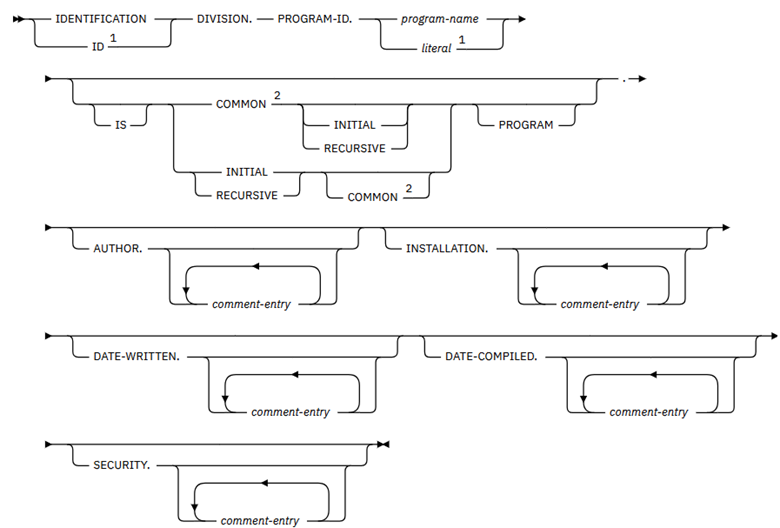
PROGRAM-ID Paragraph
The PROGRAM-ID paragraph specifies the name of the COBOL program. For an outermost program, it can also specify the name of the program object (*PGM) or module object (*MODULE), or both. It is required and must be the first paragraph in the Identification Division.
INITIAL Clause
When a program is calling a sub-program or procedure two or more times in the same program, then every time the sub-program or procedure does not act as initial sub-program or procedure. The INITIAL clause of the PROGRAM-ID paragraph of the ID division resolves this issue.
Example: Program IDPGM01 calling sub-program IDPGM02 two times.
IDENTIFICATION DIVISION.
* -----------------------*
 PROGRAM-ID. IDPGM01.
 AUTHOR.     PROGRAMMER.
 PROCEDURE DIVISION.
* ------------------*
 MAIN-LOGIC.
    CALL 'IDPGM02'.
    CALL 'IDPGM02'.
    STOP RUN.
Program IDPGM02.
 IDENTIFICATION DIVISION.
* -----------------------*
 PROGRAM-ID. IDPGM02.
 AUTHOR.     PROGRAMMER.
 DATA DIVISION.
* -------------*
 01  WS-CALL-CNT   PIC 9(02).
 01  WS-PGM-VAR    PIC 9(02) VALUE 20.
 PROCEDURE DIVISION.
* ------------------*
 MAIN-LOGIC.
    ADD 1                    TO WS-CALL-CNT.
    ADD 5                    TO WS-PGM-VAR.
    DISPLAY 'Program Variable:' WS-PGM-VAR.
    DISPLAY 'Call Count:'       WS-CALL-CNT.
    GOBACK.
Output:
Program Variable: 25
Call Count: 01
Program Variable: 30
Call Count: 02
Note: When second time IDPGM02 program is called, it picked last updated values of program fields.
Example: Program IDPGM03 calling sub-program IDPGM04 two times.
 IDENTIFICATION DIVISION.
* -----------------------*
 PROGRAM-ID. IDPGM03.
 AUTHOR.     PROGRAMMER.
 PROCEDURE DIVISION.
* ------------------*
 MAIN-LOGIC.
    CALL 'IDPGM04'.
    CALL 'IDPGM04'.
    STOP RUN.
Program IDPGM04 contains INITIAL Clause.
 IDENTIFICATION DIVISION.
* -----------------------*
 PROGRAM-ID. IDPGM04 INITIAL.
 AUTHOR.     PROGRAMMER.
 DATA DIVISION.
* -------------*
 01  WS-CALL-CNT   PIC 9(02).
 01  WS-PGM-VAR    PIC 9(02) VALUE 20.
 PROCEDURE DIVISION.
* ------------------*
 MAIN-LOGIC.
    ADD 1                    TO WS-CALL-CNT.
    ADD 5                    TO WS-PGM-VAR.
    DISPLAY 'Program Variable:' WS-PGM-VAR.
    DISPLAY 'Call Count:'       WS-CALL-CNT.
    GOBACK.
Output:
 Program Variable:25
 Call Count:01
 Program Variable:25
 Call Count:01
Note: When second time IDPGM04 program is called, it picked the initial values of the program values.
COMMON Clause
An internal procedure can be called only from its main program. If an internal procedure requires to call another sibling procedure of the same main program, then COMMON clause is applied. This clause is not applied in main program.
Example: Program IDPGM05 contains 2 internal procedures or sub-procedures. Procedure IDPRC07 contains COMMON Clauses. It is called from main program IDPGM05 and IDPRC06 procedure.
 PROCESS NOMONOSRC.
 IDENTIFICATION DIVISION.
* -----------------------*
 PROGRAM-ID. IDPGM05.
 AUTHOR. PROGRAMMER.
 PROCEDURE DIVISION.
* -----------------*
 MAIN-LOGIC.
    DISPLAY 'Started IDPGM05(CBLLE) program.'.
    CALL PROCEDURE 'IDPRC06'.
    CALL PROCEDURE 'IDPRC07'.
    DISPLAY 'Ended IDPGM05(CBLLE) program.'.
    STOP RUN.

 IDENTIFICATION DIVISION.
* -----------------------*
 PROGRAM-ID. IDPRC06.
 PROCEDURE DIVISION.
* -----------------*
 MAIN-LOGIC.
    DISPLAY 'Started IDPRC06(CBLLE) procedure.'.
    CALL PROCEDURE 'IDPRC07'.
    DISPLAY 'Ended IDPRC06(CBLLE) procedure.'
    GOBACK.
 END PROGRAM IDPRC06.

 IDENTIFICATION DIVISION.
* -----------------------*
 PROGRAM-ID. IDPRC07 COMMON.
 PROCEDURE DIVISION.
* -----------------*
 MAIN-LOGIC.
    DISPLAY 'Started IDPRC07(CBLLE) procedure.'.
    DISPLAY 'Ended IDPRC07(CBLLE) procedure.'.
    GOBACK.
 END PROGRAM IDPRC07.
 END PROGRAM IDPGM05.
Output:
Started IDPGM05(CBLLE) program.
Started IDPRC06(CBLLE) procedure.
Started IDPRC07(CBLLE) procedure.
Ended IDPRPC7(CBLLE) procedure.
Ended IDPRC6(CBLLE) procedure.
Started IDPRC07(CBLLE) procedure.
Ended IDPRC07(CBLLE) procedure.
Ended IDPGM05(CBLLE) program.
When an internal procedure is called from the main program and from sibling procedures of the same program and multiple times then programmers can apply either COMMON INITIAL clause or INITIAL COMMON clause to maintain initial state and common clause features together.
RECURSIVE Clause
The RECURSIVE clause is an optional clause that allows COBOL programs to be recursively re-entered. This clause specifies that the program and any program contained within it are recursive. ILE COBOL allows the RECURSIVE clause in a nested program. As well, recursive programs can contain a nested subprogram.
Example: Program IDPGM06 is RECURSIVE.
 ID DIVISION.
* -----------*
 PROGRAM-ID. IDPGM06 RECURSIVE.
 AUTHOR.     PROGRAMMER.
 DATA DIVISION.
* -----------------*
 WORKING-STORAGE SECTION.
 01  WS-INP-NBR        PIC 9(04) VALUE 6.
 01  WS-FACTORIAL      PIC 9(08) VALUE 1.
 PROCEDURE DIVISION.
* -----------------*
 MAIN-LOGIC.
    IF WS-INP-NBR = 0 OR 1
       COMPUTE WS-FACTORIAL = WS-FACTORIAL * 1
    ELSE
       COMPUTE WS-FACTORIAL = WS-FACTORIAL * WS-INP-NBR
       COMPUTE WS-INP-NBR = WS-INP-NBR - 1
       CALL 'IDPGM06'
    END-IF.
    DISPLAY "FACTORIAL = " WS-FACTORIAL.
    STOP RUN.
Output:
FACTORIAL = 0000720
When an internal procedure (is recursive in nature) is called from the main program and from sibling procedures of the same program then programmers can apply either COMMON RECURSIVE clause or RECURSIVE COMMON clause to maintain recursive and common clause features together.
Other Paragraphs
All other paragraphs are optional and has no effect in the program. These paragraphs are used only for comment entry.
REDEFINES Clause
In COBOL, the REDEFINES and RENAMES clauses are used to manipulate data layout and access the same memory areas in different ways.
The REDEFINES clause allows multiple data items to share the same physical memory space. There are few variants of redefines.
1. level-number data-name-1 REDEFINES data-name-2.
2. level-number data-name-1 REDEFINES data-name-2 PIC nn.
3. level-number redefining-item REDEFINES redefined-item.
Level-number – 1 sub-field1 PIC nn.
Level-number – 1 sub-field2 PIC nn.
Key Features:
- Same Level: The redefining item and the redefined item must have the same level number.
- Placement: The redefining entry must immediately follow the item it redefines.
-
Reinterpretation:
- Allows redefining an entry with the same or different data type as the redefined entry.
- Allows redefining an entry with a data length less than or equal to the redefined entry.
- Allows redefining an entry divided into subfields.
Example 01: Redefine for different data type.
 IDENTIFICATION DIVISION.
*------------------------*
 PROGRAM-ID. PROGRAMMER.
 DATA DIVISION.
*--------------*
 WORKING-STORAGE SECTION.
 01 WS-WORK-AREA.
    05 WS-INP-STR PIC X(05) VALUE "12345".
    05 WS-OUT-STR REDEFINES WS-INP-STR PIC 9(05).
 PROCEDURE DIVISION.
    IF WS-INP-STR IS NUMERIC
       ADD 10 TO WS-OUT-STR
    ELSE
       DISPLAY "Error: Input is not a number"
    END-IF.
    DISPLAY “Output String:” WS-OUT-STR.
    STOP RUN.
Output:
Output String: 12355.
Example 02: Redefine for different data length.
 DATA DIVISION.
*--------------*
 WORKING-STORAGE SECTION.
 01 WS-ORIGINAL-DATA PIC X(10) VALUE "ABCDEFGHIJ".
*   VALID: Length is equal (10 bytes)
 01 WS-NEW-VIEW-1 REDEFINES WS-ORIGINAL-DATA PIC 9(10).
*   VALID: Length is smaller (5 bytes)
 01 WS-NEW-VIEW-2 REDEFINES WS-ORIGINAL-DATA PIC X(05).
*    INVALID: Length is larger (15 bytes) -> COMPILER ERROR
* 01 WS-NEW-VIEW-3 REDEFINES WS-ORIGINAL-DATA PIC X(15).
Example 03: Redefine for dividing into sub-fields.
 DATA DIVISION.
*--------------*
 WORKING-STORAGE SECTION.
 01 WS-DATE-AREA.
    05 WS-DATE-STRING       PIC X(08).
    05 WS-DATE-PARSED REDEFINES WS-DATE-STRING.
       10 WS-YEAR           PIC 9(04).
       10 WS-MONTH          PIC 9(02).
       10 WS-DAY            PIC 9(02).
Restrictions: (All will give compilation error)
- Level number 66 or 88 cannot be redefined.
- The redefining item cannot have VALUE clause.
- In the FILE SECTION, programmers cannot use REDEFINES on level 01 entries.
e.g.
FD A-FILE LABEL RECORDS ARE STANDARD
01 A-RECORD. COPY DDS-ALL-FORMATS OF FILEA.
Difference between RENAMES & REDEFINES
| Feature | RENAMES (Level 66) | REDEFINES |
|---|---|---|
| Purpose | Regroup existing items | Reinterpret existing storage |
| Data Types | Must match source | Can change (e.g., X to 9) |
| Level Number | Only 66 | 01-49 or 77 |
| Qualification | Cannot be a qualifier | Can be a qualifier |
Example 04: Redefining few fields of externally described file.
FD  ACCT-FILE
    LABEL RECORDS ARE STANDARD.
01  ACCT-RECORD.
    COPY DDS-ALL-FORMATS OF ACCOUNT.
        06 STORAGDATE-N REDEFINES STORAGDATE   PIC X(04).
        06 ACTIVDATE-N  REDEFINES ACTIVDATE    PIC X(04).
        06 ACCESSDATE-N REDEFINES ACCESSDATE   PIC X(04).
        06 DTERATECHN-N REDEFINES DTERATECHN   PIC X(04).
Compilation output report of above copybook fields.
000029           06 STORAGDATE            PIC S9(6)         COMP-3.                 <-ALL-FMTS
000030           06 ACTIVDATE             PIC S9(6)         COMP-3.                 <-ALL-FMTS
000031           06 ACCESSDATE            PIC S9(6)         COMP-3.                 <-ALL-FMTS
000032           06 DTERATECHN            PIC S9(6)         COMP-3.                 <-ALL-FMTS
 010100         06 STORAGDATE-N REDEFINES STORAGDATE   PIC X(4).
 010200         06 ACTIVDATE-N  REDEFINES ACTIVDATE    PIC X(4).
 010300         06 ACCESSDATE-N REDEFINES ACCESSDATE   PIC X(4).
 010400         06 DTERATECHN-N REDEFINES DTERATECHN   PIC X(4).
Externally-described field “STORAGDATE” has been redefined as program-described field “STORAGDATE-N” with equivalent size byte but different data type. And, similarly others.
Example 05: Redefining few fields of externally described file.
FD  AR-FILE LABEL RECORDS ARE STANDARD.
01  AR-RCD. COPY DDS-ALL-FORMATS OF ACCTAR.
    05  MTR-TABLE REDEFINES ACCTAR-RECORD.
        10  FILLER           PIC X(10).
        10  MONTH-TOT OCCURS 12 TIMES.
             15 CURMON        PIC S9(5)V99 COMP-3.
             15 LYRMON        PIC S9(5)V99 COMP-3.
         10  FILLER           PIC X(8).
Compilation output report of above copybook fields.
025200 FD  AR-FILE
025300     LABEL RECORDS ARE STANDARD.
025400 01  AR-RCD.
025500     COPY DDS-ALL-FORMATS OF ACCTAR.
000001       05  ACCTAR-RECORD PIC X(118).                                          <-ALL-FMTS
000002*    I-O FORMAT:ARACCT     FROM FILE ACCTAR     OF LIBRARY ASHWANI            <-ALL-FMTS
000003*                                                                             <-ALL-FMTS
000004*THE KEY DEFINITIONS FOR RECORD FORMAT  ARACCT                                <-ALL-FMTS
000005*  NUMBER               NAME               RETRIEVAL     TYPE    ALTSEQ       <-ALL-FMTS
000006*   0001   WHSENO                           ASCENDING   SIGNED     NO         <-ALL-FMTS
000007*   0002   ACCTNO                           ASCENDING   SIGNED     NO         <-ALL-FMTS
000008*   0003   ARTYPE                           ASCENDING   SIGNED     NO         <-ALL-FMTS
000009       05  ARACCT        REDEFINES ACCTAR-RECORD.                             <-ALL-FMTS
000010           06 WHSENO                PIC S9(2).                                <-ALL-FMTS
000011           06 ACCTNO                PIC S9(6).                                <-ALL-FMTS
000012           06 ARTYPE                PIC S9(2).                                <-ALL-FMTS
000013           06 CURMN1                PIC S9(5)V9(2)   COMP-3.                  <-ALL-FMTS
000014           06 LSTMN1                PIC S9(5)V9(2)   COMP-3.                  <-ALL-FMTS
000015           06 CURMN2                PIC S9(5)V9(2)   COMP-3.                  <-ALL-FMTS
000016           06 LSTMN2                PIC S9(5)V9(2)   COMP-3.                  <-ALL-FMTS
000017           06 CURMN3                PIC S9(5)V9(2)   COMP-3.                  <-ALL-FMTS
000018           06 LSTMN3                PIC S9(5)V9(2)   COMP-3.                  <-ALL-FMTS
000019           06 CURMN4                PIC S9(5)V9(2)   COMP-3.                  <-ALL-FMTS
000020           06 LSTMN4                PIC S9(5)V9(2)   COMP-3.                  <-ALL-FMTS
000021           06 CURMN5                PIC S9(5)V9(2)   COMP-3.                  <-ALL-FMTS
000022           06 LSTMN5                PIC S9(5)V9(2)   COMP-3.                  <-ALL-FMTS
000023           06 CURMN6                PIC S9(5)V9(2)   COMP-3.                  <-ALL-FMTS
000024           06 LSTMN6                PIC S9(5)V9(2)   COMP-3.                  <-ALL-FMTS
000025           06 CURMN7                PIC S9(5)V9(2)   COMP-3.                  <-ALL-FMTS
000026           06 LSTMN7                PIC S9(5)V9(2)   COMP-3.                  <-ALL-FMTS
000027           06 CURMN8                PIC S9(5)V9(2)   COMP-3.                  <-ALL-FMTS
000028           06 LSTMN8                PIC S9(5)V9(2)   COMP-3.                  <-ALL-FMTS
000029           06 CURMN9                PIC S9(5)V9(2)   COMP-3.                  <-ALL-FMTS
000030           06 LSTMN9                PIC S9(5)V9(2)   COMP-3.                  <-ALL-FMTS
000031           06 CURMN10               PIC S9(5)V9(2)   COMP-3.                  <-ALL-FMTS
000032           06 LSTMN10               PIC S9(5)V9(2)   COMP-3.                  <-ALL-FMTS
000033           06 CURMN11               PIC S9(5)V9(2)   COMP-3.                  <-ALL-FMTS
000034           06 LSTMN11               PIC S9(5)V9(2)   COMP-3.                  <-ALL-FMTS
000035           06 CURMN12               PIC S9(5)V9(2)   COMP-3.                  <-ALL-FMTS
000036           06 LSTMN12               PIC S9(5)V9(2)   COMP-3.                  <-ALL-FMTS
000037           06 CURYR                 PIC S9(5)V9(2)   COMP-3.                  <-ALL-FMTS
000038           06 LSTYR                 PIC S9(5)V9(2)   COMP-3.                  <-ALL-FMTS
000039           06 BUDGET                PIC S9(5)V9(2)   COMP-3.                  <-ALL-FMTS
025600       05  MTR-TABLE REDEFINES ACCTAR-RECORD.
025700           10  FILLER           PIC X(10).
025800           10  MONTH-TOT OCCURS 12 TIMES.
025900               15 CURMON        PIC S9(5)V99 COMP-3.
026000               15 LYRMON        PIC S9(5)V99 COMP-3.
026100           10  FILLER           PIC X(8).
Externally-described record format “ARACCT” of the AR-FILE has been redefined as program-described record format “MTR-TABLE”. First 3 fields have been redefined as FILLER of 10 bytes, and then 24 fields have been redefined as CURMON and LSTMON with array.
RENAMES Clause
In COBOL, the REDEFINES and RENAMES clauses are used to manipulate data layout and access the same memory areas in different ways.
The RENAMES clause in COBOL is used to create an alternative name (alias) for a single data item or a contiguous group of data items within a group variable. This alias, defined with the special level number 66, allows you to reference a subset of fields as a single entity, which is useful for selective operations like copying or comparing specific portions of a record.
Syntax:

Key Features:
- Level Number 66: A RENAMES entry must use the special level number 66.
- Placement: All RENAMES entries must immediately follow the last data description entry for that record.
Example1:
DATA DIVISION.
WORKING-STORAGE SECTION.
01 WS-RECORD.
   05 WS-NUMBER1 PIC 9(3) VALUE 123.
   05 WS-NUMBER2 PIC 9(3) VALUE 456.
   05 WS-NUMBER3 PIC 9(3) VALUE 789.
66 WS-RENAME RENAMES WS-NUMBER1 THRU WS-NUMBER2.
Example2:
01 WS-EMPLOYEE-RECORD.
   05 EMP-FIRST-NAME    PIC X(10).
   05 EMP-MIDDLE-NAME   PIC X(10).
   05 EMP-LAST-NAME     PIC X(10).
   05 EMP-ID            PIC 9(05).
66 EMP-FULL-GIVEN-NAME RENAMES EMP-FIRST-NAME THRU EMP-LAST-NAME.
Restrictions: (All will give compilation error)
- A level 66 entry cannot rename data items with level numbers 01, 77, 88, or another 66.
- The items being renamed cannot have an OCCURS clause.
- The renamed name cannot be used for qualifier.
e.g. Below PROCEDURE DIVISION statements will give error during compilation.
MOVE WS-NUMBER2 OF WS-RENAME TO WS-NBR.
DISPLAY EMP-LAST-NAME OF EMP-FULL-GIVEN-NAME.
COBOL400 – Introduction
Introduction
COBOL400: This is the COBOL programming language used on IBM’s AS/400 (now IBM i) platform. It is a foundational, rules-based language that has been used for decades.
ILE COBOL: This is the Integrated Language Environment version of COBOL for the IBM i. It is a more modern form of COBOL that works with other languages like RPG and C++ in one environment.
Source Types in COBOL400 or ILE COBOL
There are 4 types of source types available for COBOL programs in IBM i-Series
- CBL
- CBLLE
- SQLCBL
- SQLCLBLLE

Source Types brief description
Each source type of COBOL contains different features as shown below:
- CBL – Native COBOL + Features available in IBM i-Series
- CBLLE – Native COBOL + Features available in IBM i-Series + ILE features of IBM i-Series
- SQLCBL – Native COBOL + Features available in IBM i-Series + Embedded DB2 programming
- SQLCBLLE – Native COBOL + Features available in IBM i-Series + Embedded DB2 programming + ILE features of IBM i-Series
COBOL Program objects
-
Compilation of CBL Source using the CRTCBLPGM CL Command.
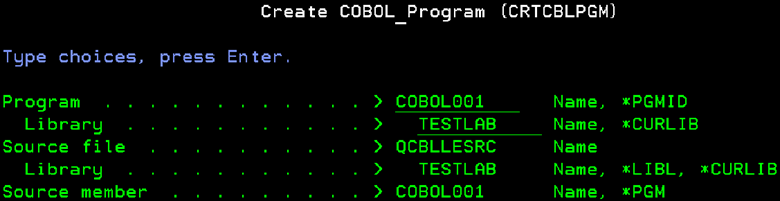
When CBL source is compiled, it generates program object – *PGM with attribute CBL.

-
Compilation of CBLLE Source using the CRTBNDCBL CL Command
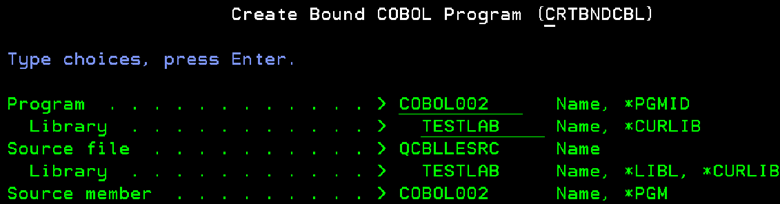
When CBLLE source is compiled, it generates program object – *PGM with attribute CBLLE.

-
Compilation of SQLCBL Source using the CRTSQLCBL CL Command.
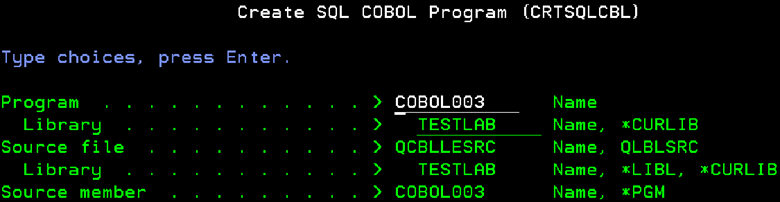
When SQLCBL source is compiled, it generates program object – *PGM with attribute CBL.

-
Compilation of SQLCBLLE Source using the CRTSQLCBLI CL Command.

When SQLCBLLE source is compiled, it generates program object – *PGM with attribute CBLLE

Looping Statements
Perform Looping Statements
Iterative programming uses loops to make a set of statements run repeatedly. The statements keep executing until a specified condition is met.
In COBOL, the PERFORM statement is used for this kind of repetitive execution.
PERFORM Types based on lines
There are 2 types of the PERFORM statements based on lines:
- Inline PERFORM
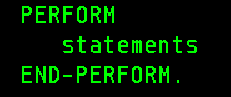
- Outline PERFORM

PERFORM Types based on formats
There are four types of PERFORM statements based on formats:
Format 1 – Basic PERFORM
Simple PERFORM is a way to execute a given paragraph or section once, and control is passed to the next statement in the flow. It is both inline and outline.
- Example1 for Inline PERFORM:
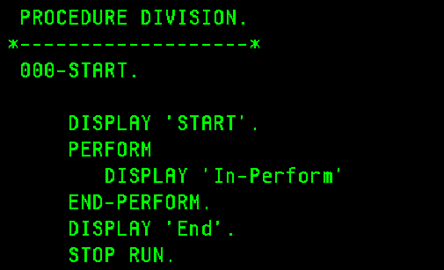
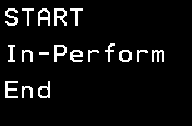
Output:
- Example 2 for Outline PERFORM:
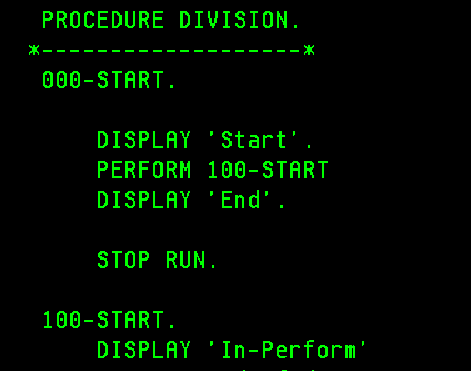
Output:
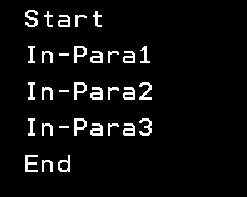
- Example for Outline PERFORM with THRU:
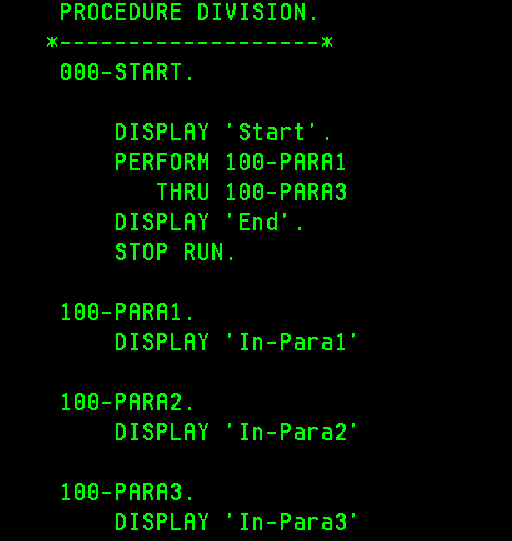
Output:
Format 2 – PERFORM with TIMES Phrase
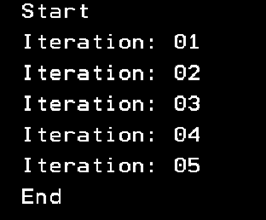
- Example for Inline PERFORM with TIMES:
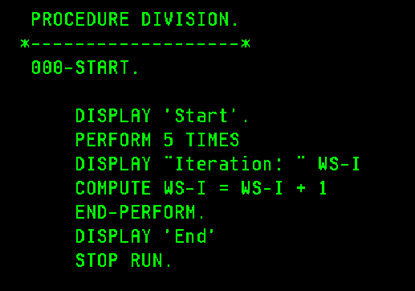
Output:
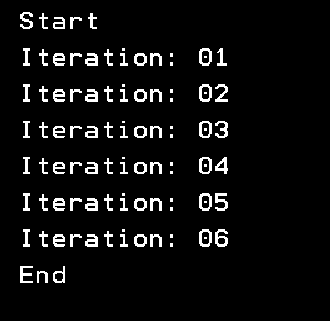
- Example for Outline PERFORM with TIMES:
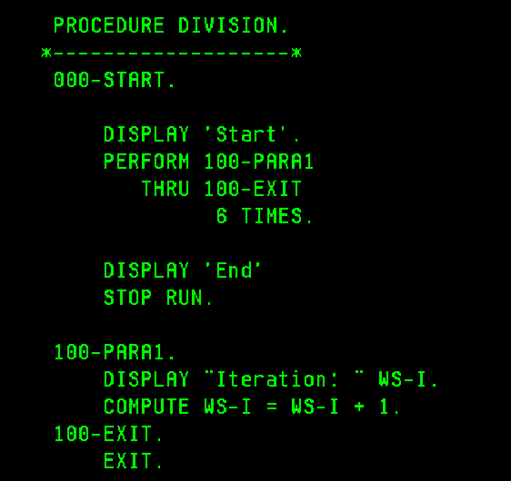
Output:
Format 3 – PERFORM with UNTIL Phrase
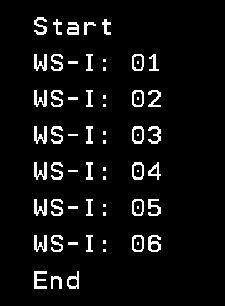
- Example for Inline PERFORM with UNTIL:
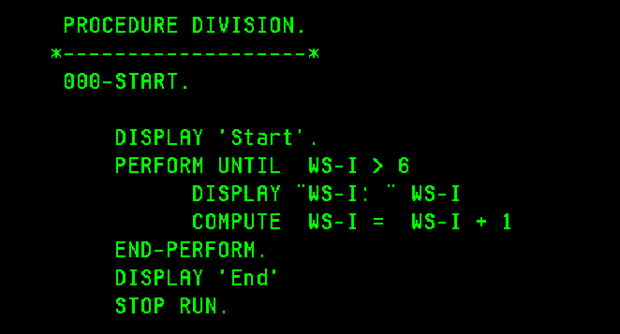
Output:
- Example for Outline PERFORM with UNTIL:
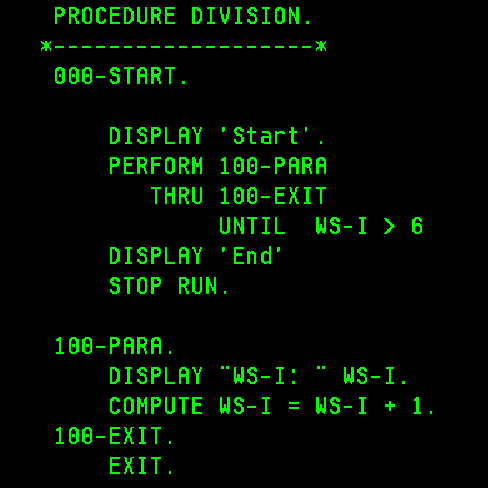
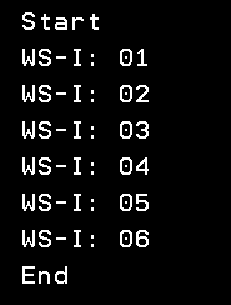
Output:
Format 4 – PERFORM with VARYING Phrase
PERFORM with VARYING executes a specific paragraph or section repetitively while varying the values of the variables until the condition is satisfied. The PERFORM with VARYING is similar to PERFORM UNTIL, but it handles the variable’s initialization, increment, or decrement. This structure provides a “for loop” functionality found in many other programming languages.
- Example for Inline PERFORM with VARYING:
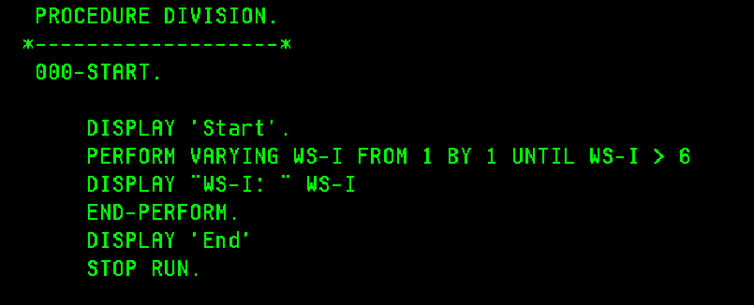
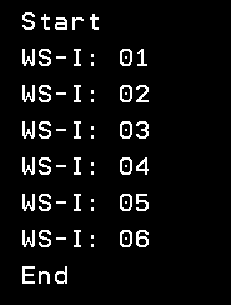
Output:
- Example for Outline PERFORM with VARYING:
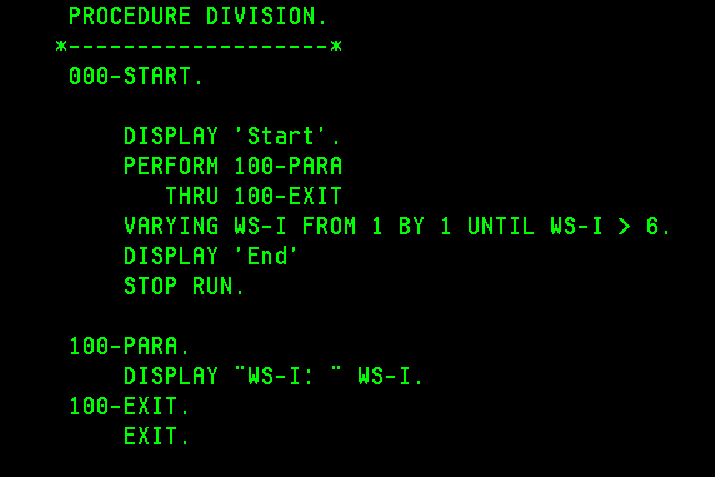
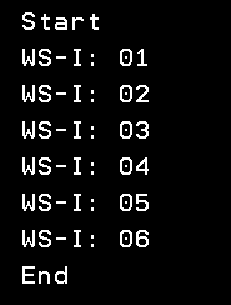
Output:
String Handling
String Handling
String handling commands are essential tools for working with and changing text (like characters and strings) in a program. It performs various operations, such as combining or separating strings, and finding or working with specific parts of a string. Programmers can also use them to count, replace, or convert characters. For example, changing text to uppercase or lowercase, or checking its total length.
In COBOL programming, three main commands handle these tasks:
- STRING
- UNSTRING
- INSPECT
STRING Verb
The STRING statement strings together the partial or complete contents of two or more data items into one single data item. Also, single STRING statement can be written instead of a series of MOVE statements.
Syntax:
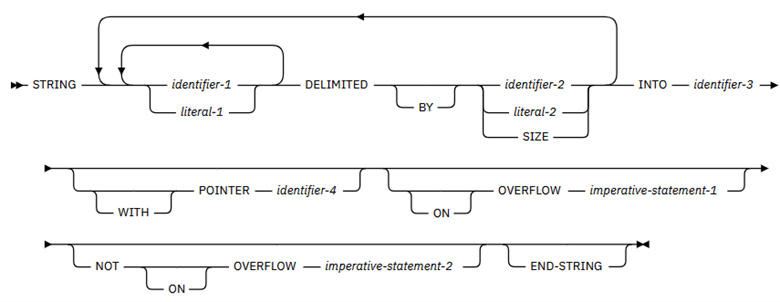
Example 1:
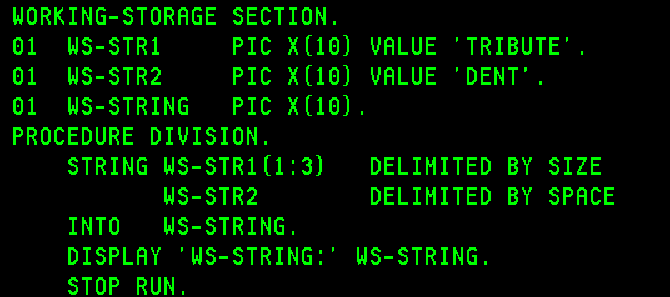
Output:

Example 2:
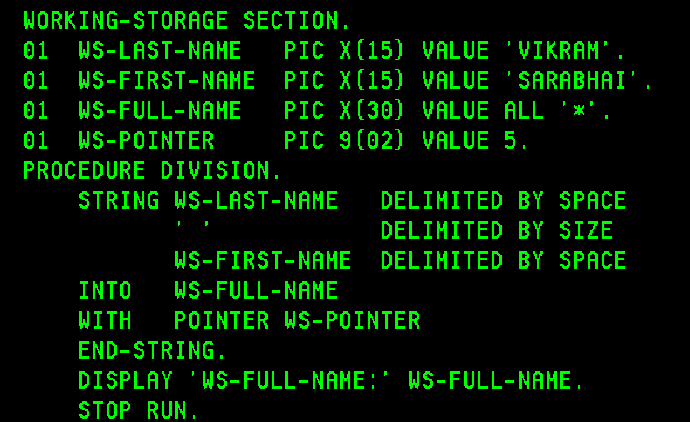
Output:

Example 3:
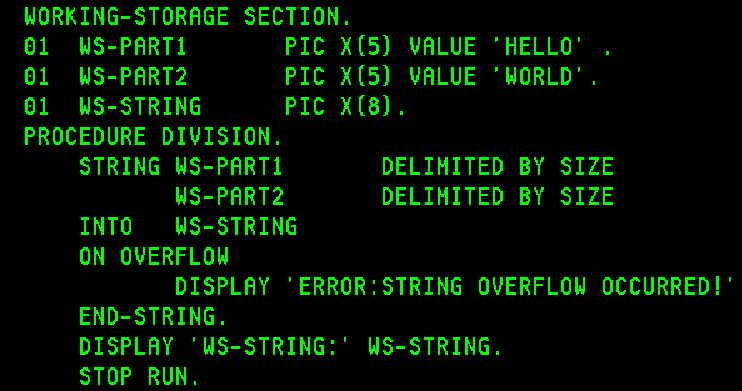
Output:

UNSTRING Verb
The UNSTRING statement causes contiguous data in a sending field to be separated and placed into multiple receiving fields. Also, single UNSTRING statement can be written instead of a series of MOVE statements.
Syntax:
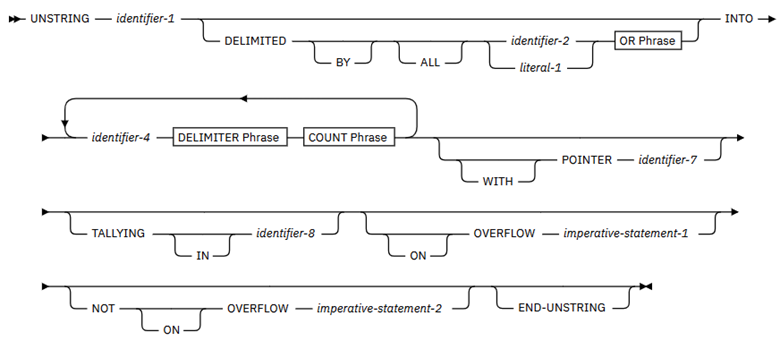
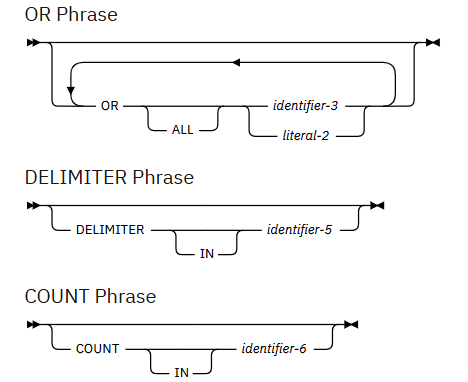
Example 1:
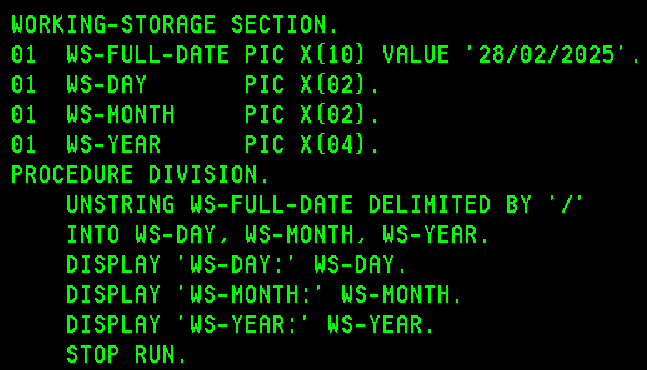
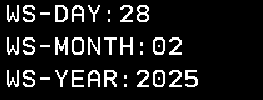
Output:
Example 2:
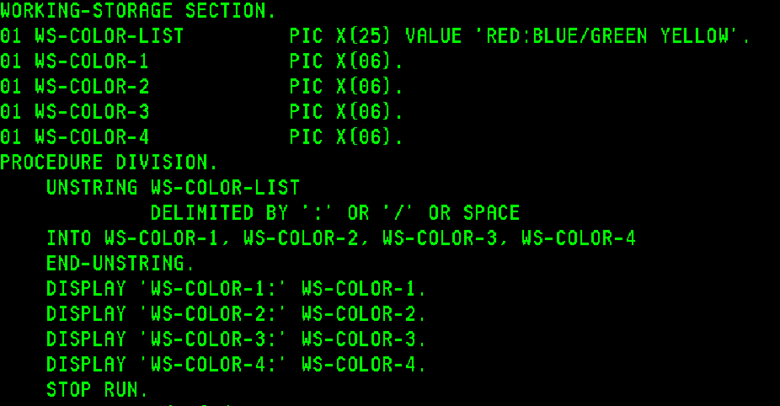
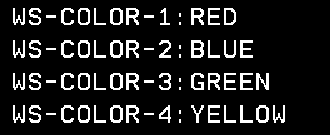
Output:
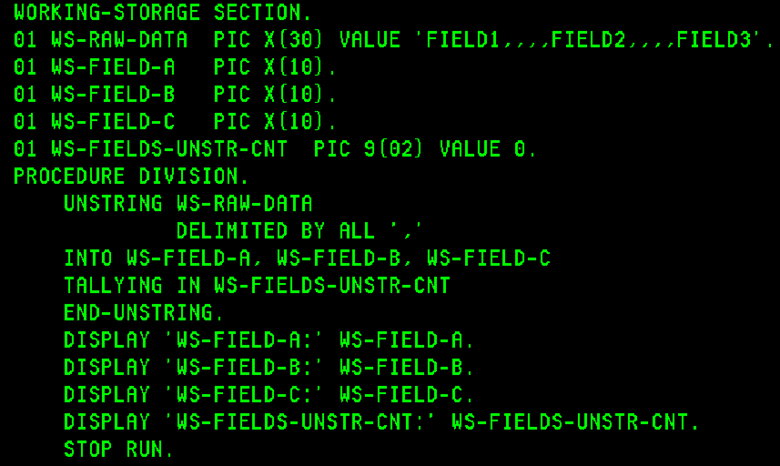
Example 3:
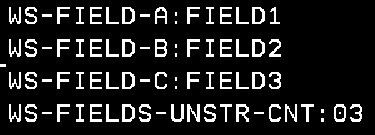
Output:
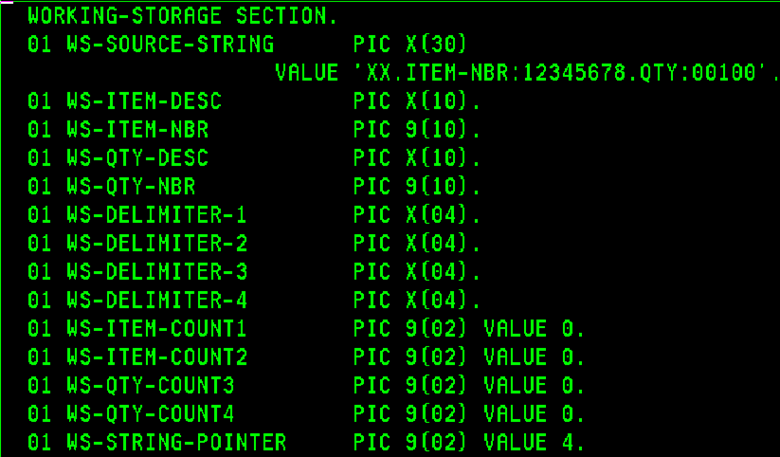
Example 4:
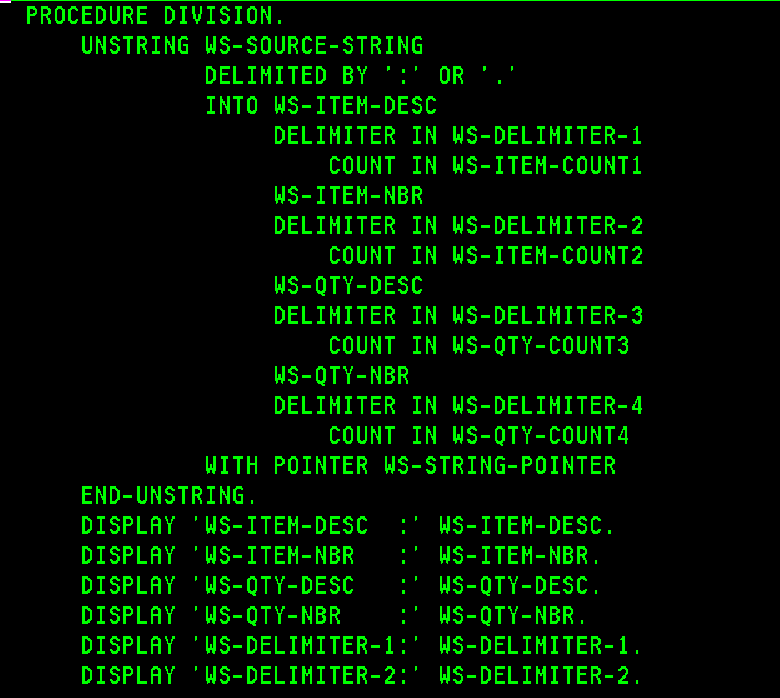
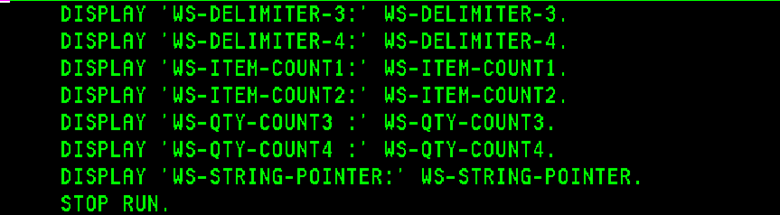
Output:
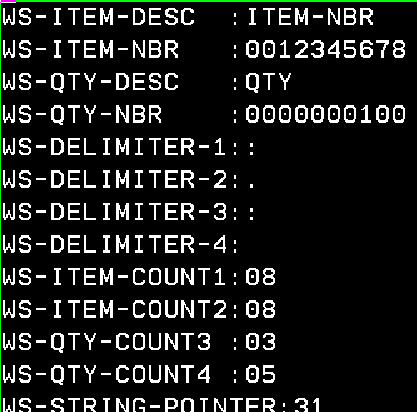
INSPECT Verb
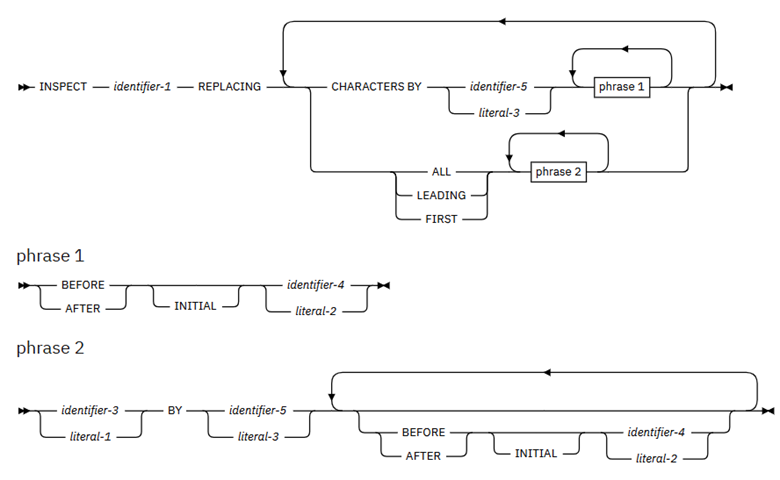
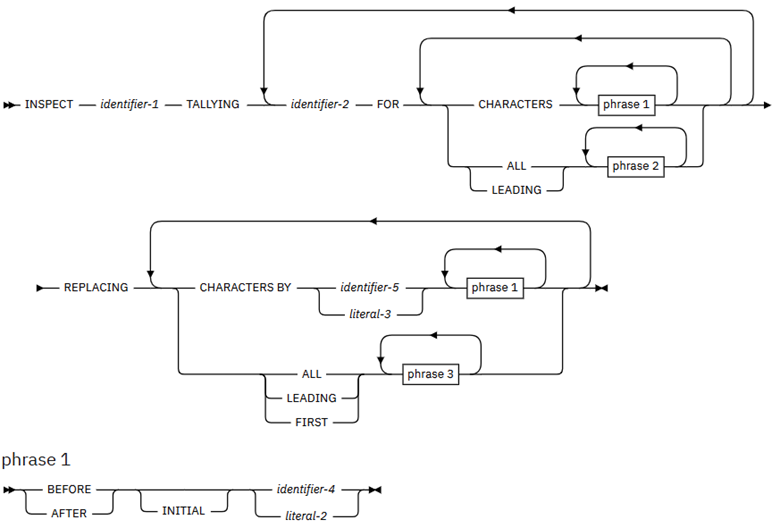
The INSPECT statement specifies that characters in a data item are to be counted (tallied), or replaced (or both).
- It will count the occurrence of a specific character (alphabetic, numeric, or special character) in a data item.
- It will fill all or portions of a data item with spaces or zeros.
- It will translate characters from one collating sequence to another.
The INSPECT statement has four formats:
- INSPECT TALLYING
- INSPECT REPLACING
- INSPECT TALLYING REPLACING
- INSPECT CONVERTING
Syntax for Format 1: INSPECT TALLYING
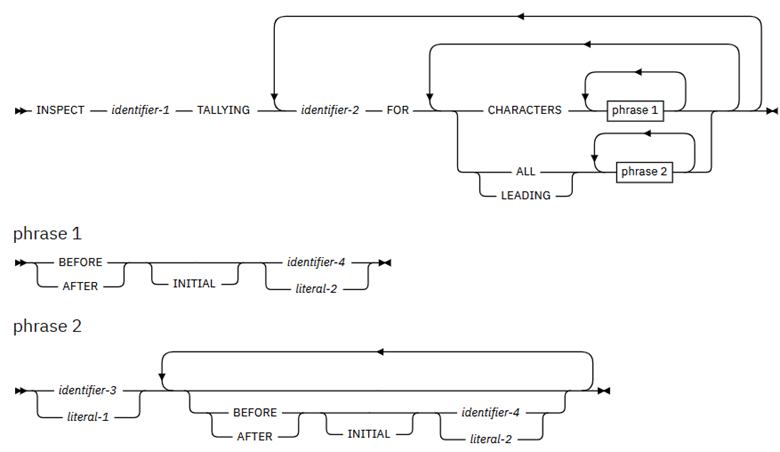
Example 1:
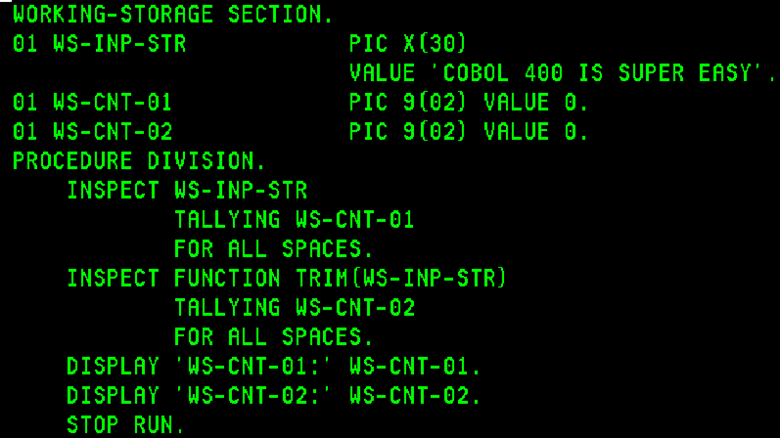
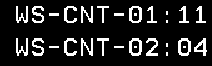
Output:
Syntax for Format 2: INSPECT REPLACING
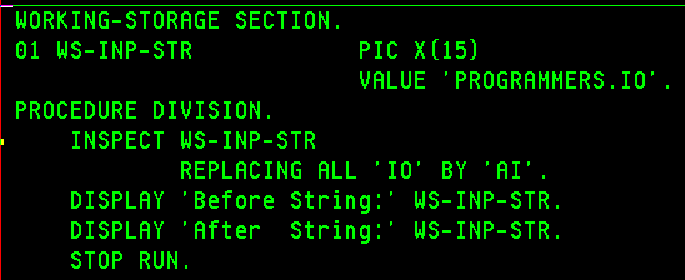
Example 1:
Output:

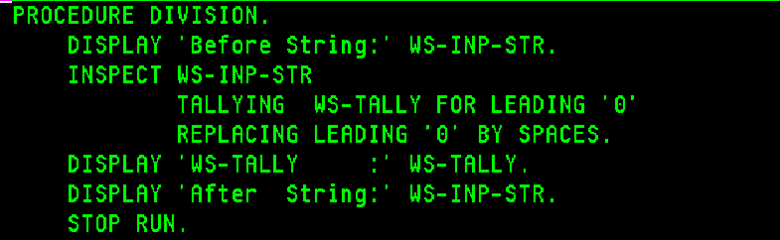
Syntax for Format 3: INSPECT TALLYING REPLACING
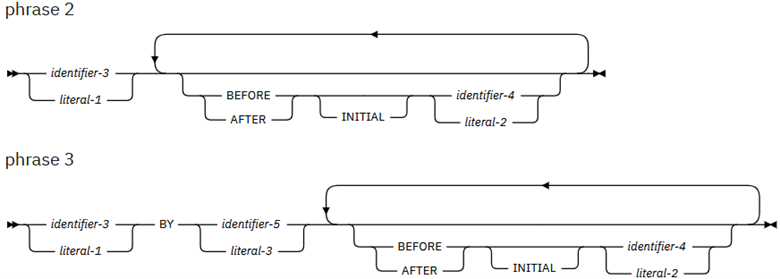
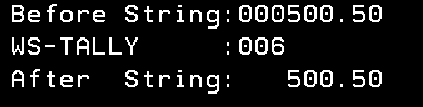
Example 1:
Output:
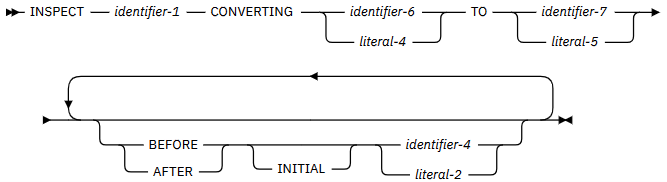
Syntax for Format 4: INSPECT CONVERTING
Example 1:
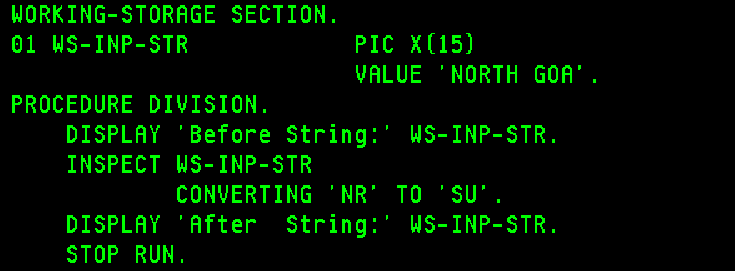
Output:

Table Handling
In ILE COBOL, a table is the equivalent of an array in other programming languages. It is a collection of logically consecutive data items that share the same description and are defined in the DATA DIVISION using the OCCURS clause.
Table Declaration
A table is a group of repeated data items stored together under one name. It helps to store multiple values of the same type — like names, prices, or marks — using a single variable name with positions (1, 2, 3…).
Key Points:
- The tables are declared in the DATA DIVISION.
- The OCCURS clause defines repetition of data items.
- It tells COBOL how many times a field or group repeats.
- We can use OCCURS with level numbers from 02 to 49.
- OCCURS clause does not work with REDEFINES in the same declaration.
- Programmers can also define INDEXED BY to create an index for faster access.
One-Dimensional Table
A one-dimensional table is like a single row or list.
It has elements arranged in a single line and can be accessed by position (1, 2, 3, …).
Syntax:
01 WS-TABLE.
     05 WS-A PIC A (10) OCCURS 10 TIMES.
Program:
IDENTIFICATION DIVISION.
*-------------------------*
PROGRAM-ID.    PGM5.
AUTHOR.        PROGRAMMERS.

ENVIRONMENT DIVISION.
*---------------------*
CONFIGURATION SECTION.
SOURCE-COMPUTER.  IBM1-Series.
OBJECT-COMPUTER.  IBM1-Series.

DATA DIVISION.
WORKING-STORAGE SECTION.
01 WS-TABLE.
   05 WS-A PIC A(20) VALUE 'Programmers.ai' OCCURS 5 TIMES.

PROCEDURE DIVISION.
    DISPLAY "ONE-D TABLE : " WS-TABLE.
    STOP RUN.
Output:
ONE-D TABLE:  Programmers.ai  Programmers.ai  Programmers.ai
Programmers.ai  Programmers.ai  Programmers.ai
Explanation:
- The table WS-TABLE contains 5 elements.
- Each element WS-A can hold 10 characters.
- All elements are initialized with ‘Programmers.ai’.
- The DISPLAY statement shows all 5 values on the screen.
Two-Dimensional Table
A two-dimensional table is like a matrix or grid.
It stores data in rows and columns, such as marks of students in subjects.
Syntax:
01 WS-MARKS.
   05 STUDENT OCCURS 3 TIMES.
      10 SUBJECT OCCURS 2 TIMES.
         15 WS-MARK PIC 9(3).
Program:
IDENTIFICATION DIVISION.
*-------------------------*
PROGRAM-ID.    PGM1.
AUTHOR.        PROGRAMMERS.

ENVIRONMENT DIVISION.
*---------------------*
CONFIGURATION SECTION.
SOURCE-COMPUTER.  IBM1-Series.
OBJECT-COMPUTER.  IBM1-Series.

DATA DIVISION.
WORKING-STORAGE SECTION.
01 WS-TABLE.
   05 WS-A OCCURS 2 TIMES.
      10 WS-B PIC A(10) VALUE 'User'.
      10 WS-C OCCURS 2 TIMES.
         15 WS-D PIC X(6) VALUE 'COBOL'.

PROCEDURE DIVISION.
    DISPLAY "TWO-D TABLE : " WS-TABLE.

    STOP RUN.
Output:
TWO-D TABLE : User COBOL COBOL User COBOL COBOL
Explanation:
- The outer OCCURS (2 TIMES) means 2 main branches.
- The inner OCCURS (2 TIMES) means 2 sub-branches.
Subscript
A subscript is a simple number that identifies which element of the table you want to use.
- Subscripts always start from 1.
- You write it inside parentheses () after the table name.
- You can use a variable to hold the subscript number.
Program:
IDENTIFICATION DIVISION.
*-------------------------*
PROGRAM-ID.    PGM3.
AUTHOR.        PROGRAMMERS.

ENVIRONMENT DIVISION.
*---------------------*
CONFIGURATION SECTION.
SOURCE-COMPUTER.  IBM1-Series.
OBJECT-COMPUTER.  IBM1-Series.

DATA DIVISION.
WORKING-STORAGE SECTION.
01 WS-NAME.
   05 WS-STUDENT PIC A(15) OCCURS 3 TIMES.
   77 I PIC 9 VALUE 1.

PROCEDURE DIVISION.
    MOVE "Amitabh" TO WS-STUDENT(1)
    MOVE "Mithun" TO WS-STUDENT(2)
    MOVE "Harshit" TO WS-STUDENT(3)
    DISPLAY "STUDENT NAME: " WS-STUDENT(I)
    STOP RUN.
Output:
STUDENT NAME: Amitabh
Explanation:
- Subscript(I) choose which element to display.
- We have entered 1, program shows ‘Amitabh’.
INDEXED BY
An index is a special internal counter COBOL uses to track the current element’s position in a table.
- It is faster than a subscript.
- It is defined using INDEXED BY in the table declaration.
- The index value can only be changed using the SET statement.
Syntax:
01 WS-CLASS
     03 WS-STUDENT OCCURS 2 TIMES INDEXED BY WS-IDX.
         05 WS-ROLLNO    PIC X(04).
         05 WS-NAME      PIC X(15).
Program:
IDENTIFICATION DIVISION.
*-------------------------*
PROGRAM-ID.    PGM6.
AUTHOR.        PROGRAMMERS.

ENVIRONMENT DIVISION.
*---------------------*
CONFIGURATION SECTION.
SOURCE-COMPUTER.  IBM1-Series.
OBJECT-COMPUTER.  IBM1-Series.

DATA DIVISION.
WORKING-STORAGE SECTION.
01 WS-CLASS.
   03 WS-STUDENT OCCURS 2 TIMES INDEXED BY IDX-ONE.
      05 WS-ROLL-NO    PIC X(03).
      05 WS-NAME       PIC X(12).

PROCEDURE DIVISION.

    MOVE "001Harshit Y" TO WS-STUDENT(1).
    MOVE "002Ranbir Y"  TO WS-STUDENT(2).
    DISPLAY "Class Information: " WS-CLASS.
    DISPLAY " ".

    SET IDX-ONE TO 1.
    DISPLAY "Students Information => ".
	PERFORM UNTIL IDX-ONE > 2
     DISPLAY "Roll No: " WS-ROLL-NO(IDX-ONE)
     DISPLAY "Name:    " WS-NAME(IDX-ONE)
     SET IDX-ONE UP BY 1
    END-PERFORM.

    STOP RUN.
Output:
Class Information: 001Harshit Y    002Ranbir Y

Students Information =>
Roll No: 001
Name:    Harshit Y
Roll No: 002
Name:    Ranbir Y
Explanation:
Array Setup: Defines WS-CLASS with 2 student entries, each having Roll No and Name, accessed using an index IDX-ONE.
Data Loading: Moves two student details into the array and displays the entire class data.
Loop & Display: Starts index at 1, loops until 2, prints each student’s roll number and name, then increments the index.
SET Statement
The SET statement is used to move or change the position of an index. Set verb is used to initialize, increment, or decrement the index value.
Syntax:
SET index-name TO n
SET index-name UP BY n
SET index-name DOWN BY n
Program:
IDENTIFICATION DIVISION.
*-------------------------*
PROGRAM-ID.    PGM6.
AUTHOR.        PROGRAMMERS.

ENVIRONMENT DIVISION.
*---------------------*
CONFIGURATION SECTION.
SOURCE-COMPUTER.  IBM1-Series.
OBJECT-COMPUTER.  IBM1-Series.

DATA DIVISION.
WORKING-STORAGE SECTION.
01 WS-TABLE.
   05 WS-A OCCURS 3 TIMES INDEXED BY I.
      10 WS-B PIC A(2).
      10 WS-C OCCURS 2 TIMES INDEXED BY J.
         15 WS-D PIC X(3).

PROCEDURE DIVISION.
    MOVE '12ABCDEF34GHIJKL56MNOPQR' TO WS-TABLE.
    SET I J TO 1.
    DISPLAY WS-C(I, J).
    SET J UP BY 1.
    DISPLAY WS-C(I, J).


STOP RUN.
Output:
ABC
JKL
Explanation:
- Set the value to the positions and display that element.
FORMAT Clause
The IBM i series, specifically ILE COBOL or COBOL400, has several features that differentiate it from mainframe, Micro Focus, and other COBOL environments. One of these is the FORMAT clause, which is used to declare DATE, TIME, and TIMESTAMP fields in the DATA DIVISION.
Use of FORMAT Clause
The FORMAT clause is used to specify a default format for a DATA DIVISION date, time or timestamp item.
Example: (For FORMAT DATE)
 IDENTIFICATION DIVISION.
*-----------------------*
 PROGRAM-ID.       DATFUNC02.
 AUTHOR.           PROGRAMMERS.
 ENVIRONMENT DIVISION.
*---------------------*
 CONFIGURATION SECTION.
 SOURCE-COMPUTER.  IBMi-Series.
 OBJECT-COMPUTER.  IBMi-Series.
 DATA DIVISION.
*---------------------*
 WORKING-STORAGE SECTION.
 01  POLICY-EFF-DATE   FORMAT DATE '@Y-%m-%d' VALUE '2021-11-12'.
 01  POLICY-EXP-DATE   FORMAT DATE '@Y/%m/%d' VALUE '2029/12/31'.
 01  POLICY-MAT-DATE   FORMAT DATE '@Y%m%d'   VALUE '20261112'.
 01  NEXT-DUE-DATE     FORMAT DATE '%m%d%y'   VALUE '070125'.
 01  EUR-FORMAT-DATE   FORMAT DATE '%d.%m.@Y' VALUE '01.12.2025'.
 01  USA-FORMAT-DATE   FORMAT DATE '%m/%d/@Y' VALUE '12/01/2025'.
 PROCEDURE DIVISION.
 MAIN-LOGIC.
     DISPLAY 'Policy-Effective-Date:' POLICY-EFF-DATE
     DISPLAY 'Policy-Expiry-Date   :' POLICY-EXP-DATE
     DISPLAY 'Policy-Maturity-Date :' POLICY-MAT-DATE
     DISPLAY 'Payment-Next-Due-Date:' NEXT-DUE-DATE
     DISPLAY 'EUR-Format-Date      :' EUR-FORMAT-DATE
     DISPLAY 'USA-Format-Date      :' USA-FORMAT-DATE
     STOP RUN.
Output:
Policy-Effective-Date:2021-11-12
Policy-Expiry-Date   :2029/12/31
Policy-Maturity-Date :20261112
Payment-Next-Due-Date:070125
EUR-Format-Date      :01.12.2025
USA-Format-Date      :12/01/2025
Example: (For FORMAT DATE & MOVE)
 IDENTIFICATION DIVISION.
*-----------------------*
 PROGRAM-ID.       DATFUNC03.
 AUTHOR.           PROGRAMMERS.
 ENVIRONMENT DIVISION.
*---------------------*
 CONFIGURATION SECTION.
 SOURCE-COMPUTER.  IBMi-Series.
 OBJECT-COMPUTER.  IBMi-Series.
 DATA DIVISION.
*---------------------*
 WORKING-STORAGE SECTION.
 01  POLICY-EFF-DATE   FORMAT DATE '@Y-%m-%d' VALUE '2021-11-12'.
 01  WS-POLICY-EFF     FORMAT DATE '%m%d%y'.
 PROCEDURE DIVISION.
 MAIN-LOGIC.
     MOVE POLICY-EFF-DATE TO WS-POLICY-EFF.
     MOVE POLICY-EFF-DATE TO WS-POLICY-EFF.
     DISPLAY 'WS-POLICY-EFF:' WS-POLICY-EFF.
     STOP RUN.
Output:
WS-POLICY-EFF:111221
Example: (For FORMAT TIME & MOVE)
 IDENTIFICATION DIVISION.
*-----------------------*
 PROGRAM-ID.       DATFUNC04.
 AUTHOR.           PROGRAMMERS.
 ENVIRONMENT DIVISION.
*---------------------*
 CONFIGURATION SECTION.
 SOURCE-COMPUTER.  IBMi-Series.
 OBJECT-COMPUTER.  IBMi-Series.
 DATA DIVISION.
*---------------------*
 WORKING-STORAGE SECTION.
 01  WS-TIME-A1        FORMAT TIME '%I:%M @p' VALUE '06:20 am'.
 01  WS-TIME-A2        LIKE WS-TIME-A1.
 PROCEDURE DIVISION.
 MAIN-LOGIC.
     MOVE WS-TIME-A1      TO WS-TIME-A2.
     DISPLAY 'WS-TIME-A1:'   WS-TIME-A1.
     DISPLAY 'WS-TIME-A2:'   WS-TIME-A2.
     STOP RUN.
Output:
WS-TIME-A1:06:20 am
WS-TIME-A2:06:20 AM
Example: (For FORMAT TIMESTAMP)
 IDENTIFICATION DIVISION.
*-----------------------*
 PROGRAM-ID.       DATFUNC05.
 AUTHOR.           PROGRAMMERS.
 ENVIRONMENT DIVISION.
*---------------------*
 CONFIGURATION SECTION.
 SOURCE-COMPUTER.  IBMi-Series.
 OBJECT-COMPUTER.  IBMi-Series.
 DATA DIVISION.
*---------------------*
 WORKING-STORAGE SECTION.
 01  CARD-NEW-TIMESTAMP FORMAT TIMESTAMP VALUE
                        '2020-01-01-00.00.01.000001'.
 01  CARD-EXP-TIMESTAMP LIKE CARD-NEW-TIMESTAMP.
 PROCEDURE DIVISION.
 MAIN-LOGIC.
     MOVE FUNCTION ADD-DURATION(CARD-NEW-TIMESTAMP YEARS 5)
                          TO CARD-EXP-TIMESTAMP.
     DISPLAY 'CARD-NEW-TIMESTAMP:' CARD-NEW-TIMESTAMP.
     DISPLAY 'CARD-EXP-TIMESTAMP:' CARD-EXP-TIMESTAMP.
     STOP RUN.
Output:
CARD-NEW-TIMESTAMP:2020-01-01-00.00.01.000001
CARD-EXP-TIMESTAMP:2025-01-01-00.00.01.000001
LIKE Clause
The IBM i series, with ILE COBOL or COBOL400, offers several features that differentiate it from mainframe, Micro Focus, and other COBOL environments. One among these is the LIKE clause used in the DATA DIVISION.
Use of LIKE Clause
The LIKE clause acts like a “data type template”. It is a shortcut command that instructs the compiler to create a new data variable with the exact same type and size as the referenced variable. In ILE COBOL, this LIKE clause is similar to the LIKE keyword used in the D-SPEC of RPGLE programming.
Example:
 IDENTIFICATION DIVISION.
*-----------------------*
 PROGRAM-ID.       DATATYP01.
 AUTHOR.           PROGRAMMERS.
 ENVIRONMENT DIVISION.
*---------------------*
 CONFIGURATION SECTION.
 SOURCE-COMPUTER.  Programmers-Lab.
 OBJECT-COMPUTER.  Programmers-Lab.
 DATA DIVISION.
*---------------------*
 WORKING-STORAGE SECTION.
 01  WS-PGM-VAR1     PIC A(20)             VALUE 'QWERTYASDF'.
 01  WS-PGM-VAR2     PIC S9(3)V9(2) COMP-3 VALUE 17.22.
 01  WS-PGM-DAT3     PIC 9(08)             VALUE 29022024.
* == Use of LIKE Clause. ==
 01  WS-LIK-VAR1     LIKE WS-PGM-VAR1.
 01  WS-LIK-VAR2     LIKE WS-PGM-VAR2.
 01  WS-LIK-DAT3     LIKE WS-PGM-DAT3.
 PROCEDURE DIVISION.
 MAIN.
     MOVE WS-PGM-VAR1         TO WS-LIK-VAR1.
     MOVE WS-PGM-VAR2         TO WS-LIK-VAR2.
     MOVE WS-PGM-DAT3         TO WS-LIK-DAT3.
     DISPLAY "Like Variable 1:" WS-LIK-VAR1.
     DISPLAY "Like Variable 2:" WS-LIK-VAR2.
     DISPLAY "Like Variable 3:" WS-LIK-DAT3.
     STOP RUN.
Output:
Like Variable 1:QWERTYASDF
Like Variable 2:01722
Like Variable 3:29022024
Snippet during debug:
When attribute of WS-LIK-VAR1, WS-LIK-VAR2, WS-LIK-DAT3 was requested, the compiler returned below statement.
> ATTR WS-PGM-VAR1
  TYPE = FIXED LENGTH STRING, LENGTH = 20 BYTES
> ATTR WS-LIK-VAR1
  TYPE = FIXED LENGTH STRING, LENGTH = 20 BYTES
> ATTR WS-PGM-VAR2
  TYPE = PACKED(5,2), LENGTH = 3 BYTES
> ATTR WS-LIK-VAR2
  TYPE = PACKED(5,2), LENGTH = 3 BYTES
> ATTR WS-PGM-DAT3
  TYPE = ZONED(8,0), LENGTH = 8 BYTES
> ATTR WS-LIK-DAT3
  TYPE = ZONED(8,0), LENGTH = 8 BYTES
Note: LIKE clause does not work with REDEFINES, SIGN, USAGE, PICTURE, FORMAT, TYPE and TYPEDEF clause.
CONSTANT Clause
The IBM i series, with ILE COBOL or COBOL400, offers several features that differ from mainframes and other COBOL environments. One of these is the CONSTANT clause used in the DATA DIVISION.
Use of CONSTANT Clause
The CONSTANT clause creates a constant field that cannot be changed during the program cycle. Programmers use the CONSTANT clause to introduce numeric, alphanumeric, and hexadecimal constants in ILE programs, such as single quotes, double quotes, commas, the ENTER key, etc. In ILE COBOL, this CONSTANT clause is similar to the CONST keyword used in the D-SPEC of RPGLE programming.
Example:
 IDENTIFICATION DIVISION.
*-----------------------*
 PROGRAM-ID.       DATATYP01A.
 AUTHOR.           PROGRAMMERS.
 ENVIRONMENT DIVISION.
*---------------------*
 CONFIGURATION SECTION.
 SOURCE-COMPUTER.  IBMi-Series.
 OBJECT-COMPUTER.  IBMi-Series.
 DATA DIVISION.
*---------------------*
 WORKING-STORAGE SECTION.
 01  WS-VAR1         PIC 9(02)   VALUE 20.
 01  WS-VAR3         PIC 9(02).
 01  WS-STR1         PIC X(30).
* ==Use of Numeric,Character, Hexadecimal Constant==*
 01  WS-VAR2         CONSTANT 10.
 01  WS-VAR2         CONSTANT 10.
 01  WS-CHRX         CONSTANT 'CONST'.
 01  WS-SQUOTE       CONSTANT x'7D'.
 PROCEDURE DIVISION.
 MAIN.
     COMPUTE WS-VAR3 = WS-VAR1 + WS-VAR2.
     STRING  'McDonald       DELIMITED BY SIZE
             WS-SQUOTE       DELIMITED BY SPACE
             's Burger'      DELIMITED BY SIZE
     INTO    WS-STR1
     END-STRING.
     DISPLAY "Numeric Constant    :" WS-VAR3.
     DISPLAY "Character Constant  :" WS-CHRX.
     DISPLAY "Hexadecimal Constant:" WS-STR1.
     STOP RUN.
Output:
Numeric Constant    :30
Character Constant  :CONST
Hexadecimal Constant:McDonald's Burger
Note: The CONSTANT clause can only be specified for level 01 entries for elementary constant name.
TYPE & TYPEDEF Clauses
The IBM i series, with ILE COBOL or COBOL400, offers several features that distinguish it from mainframes and other COBOL environments. One of them is the usage of TYPE and TYPEDEF clause in the DATA DIVISION.
Use of TYPEDEF & TYPE Clause
In ILE COBOL, programmers can use the TYPEDEF clause to create user-defined data types. User-defined data types are not added to the existing ILE COBOL data types, such as alphanumeric, numeric, boolean, etc. These type definitions act as templates that can then be used to define new data items using the TYPE clause.
This TYPEDEF and TYPE clause combination has a similar effect to the TEMPLATE keyword in RPGLE programs.
Example:
 IDENTIFICATION DIVISION.
*------------------------*
 PROGRAM-ID.       DATATYP05.
 AUTHOR.           PROGRAMMERS.
 ENVIRONMENT DIVISION.
*---------------------*
 CONFIGURATION SECTION.
 SOURCE-COMPUTER.  ProgrammersIO-Lab.
 OBJECT-COMPUTER.  ProgrammersIO-Lab.
 DATA DIVISION.
*--------------*
 WORKING-STORAGE SECTION.
*=== Define TYPEDEF Clause ===*
 01  CUSTOMER-REC-TYPE    TYPEDEF.
     05 CUSTOMER-ID       PIC X(10).
     05 CUSTOMER-NAME     PIC X(30).
     05 CUSTOMER-BALANCE  PIC S9(7)V99.
*=== Utilize TYPEDEF fields from TYPE Clause ===*
 01 CUSTOMER-A            TYPE CUSTOMER-REC-TYPE.
 01 CUSTOMER-B            TYPE CUSTOMER-REC-TYPE.
 PROCEDURE DIVISION.
     MOVE 'CUST001'       TO CUSTOMER-ID      OF  CUSTOMER-A.
     MOVE 'John Doe'      TO CUSTOMER-NAME    OF  CUSTOMER-A.
     MOVE 123.45          TO CUSTOMER-BALANCE OF  CUSTOMER-A.
     MOVE 'CUST002'       TO CUSTOMER-ID      OF  CUSTOMER-B.
     MOVE 'Jane Smith'    TO CUSTOMER-NAME    OF  CUSTOMER-B.
     MOVE 543.21          TO CUSTOMER-BALANCE OF  CUSTOMER-B.
     DISPLAY 'Customer A ID     : ' CUSTOMER-ID   OF CUSTOMER-A.
     DISPLAY 'Customer A Name   : ' CUSTOMER-NAME OF CUSTOMER-A.
     DISPLAY 'Customer A Balance: ' CUSTOMER-BALANCE
                                                  OF CUSTOMER-A.
     DISPLAY 'Customer B ID     : ' CUSTOMER-ID   OF CUSTOMER-B.
     DISPLAY 'Customer B Name   : ' CUSTOMER-NAME OF CUSTOMER-B.
     DISPLAY 'Customer B Balance: ' CUSTOMER-BALANCE
	                                             OF CUSTOMER-B.
     STOP RUN.
Output:
Customer A ID     : CUST001
Customer A Name   : John Doe
Customer A Balance: 000012345
Customer B ID     : CUST002
Customer B Name   : Jane Smith
Customer B Balance: 000054321
PROGRAM STATUS Clause
IBM i series offers several environment features in ILE COBOL or COBOL400 that differ from mainframe, Micro Focus, and other COBOL environments. One among them is the PROGRAM STATUS clause.
PROGRAM STATUS Clause
RPG programs when using program status data structure, its subfields give details of running program at runtime. In COBOL400 or ILE COBOL programs limited but similar information can be achieved via the PROGRAM STATUS clause of the SPECIAL-NAMES paragraph of the CONFIGURATION SECTION.
Programmers need to declare program status group variable which consists of 94 characters only.
Example:
 IDENTIFICATION DIVISION.
* -----------------------*
 PROGRAM-ID.          COBOL12.
 AUTHOR.              PROGRAMMERS.
 ENVIRONMENT DIVISION.
* --------------------*
 CONFIGURATION SECTION.
 SOURCE-COMPUTER.     IBM-ISERIES.
 OBJECT-COMPUTER.     IBM-ISERIES.
 SPECIAL-NAMES.       PROGRAM STATUS IS WS-PGM-STATUS1.
 DATA DIVISION.
* ------------*
 WORKING-STORAGE SECTION.
 01  WS-RESULT                             PIC 9(01)V9(02).
 01  WS-PGM-STATUS1                        PIC X(94).
     05 WS-PGM-NAM                         PIC X(10).
     05 WS-PGM-LIB                         PIC X(10).
     05 WS-MOD-NAM                         PIC X(10).
     05 WS-STM-NBR                         PIC X(10).
     05 WS-OPT-LVL                         PIC X(06).
     05 WS-ECP-MSG                         PIC X(07).
     05 WS-JOB-NAM                         PIC X(10).
     05 WS-JOB-NBR                         PIC X(06).
     05 WS-JOB-TYP                         PIC X(01).
     05 WS-USR-PRF                         PIC X(10).
     05 WS-TIM-STAMP                       PIC X(14).
 PROCEDURE DIVISION.
 000-MAINLINE-PARA.
*    DIVIDE BY ZERO ERROR
     DIVIDE  100 BY 0
        GIVING WS-RESULT
            ON SIZE ERROR PERFORM 011-HANDLE-ERROR-PARA
                             THRU 011-HANDLE-ERROR-PARA-EXIT
        NOT ON SIZE ERROR DISPLAY 'WS-RESULT:'  WS-RESULT.
*    CALL PROGRAM OBJECT NOT FOUND
     CALL "ABC001"
     ON EXCEPTION PERFORM 011-HANDLE-ERROR-PARA
                     THRU 011-HANDLE-ERROR-PARA-EXIT.
     STOP RUN.
*
 011-HANDLE-ERROR-PARA.
     DISPLAY 'WS-PGM-NAM  :' WS-PGM-NAM.
     DISPLAY 'WS-PGM-LIB  :' WS-PGM-LIB.
     DISPLAY 'WS-MOD-NAM  :' WS-MOD-NAM.
     DISPLAY 'WS-STM-NBR  :' WS-STM-NBR.
     DISPLAY 'WS-OPT-LVL  :' WS-OPT-LVL.
     DISPLAY 'WS-ECP-MSG  :' WS-ECP-MSG.
     DISPLAY 'WS-JOB-NAM  :' WS-JOB-NAM.
     DISPLAY 'WS-JOB-NBR  :' WS-JOB-NBR.
     DISPLAY 'WS-JOB-TYP  :' WS-JOB-TYP.
     DISPLAY 'WS-USR-PRF  :' WS-USR-PRF.
     DISPLAY 'WS-TIM-STAMP:' WS-TIM-STAMP.
 011-HANDLE-ERROR-PARA-EXIT.
     EXIT.
Output for Divide by zero: (MCH1211)
WS-PGM-NAM  :COBOL12
WS-PGM-LIB  :PIOLIB
WS-MOD-NAM  :COBOL12
WS-STM-NBR  :26
WS-OPT-LVL  :*NONE
WS-ECP-MSG  :MCH1211
WS-JOB-NAM  :QPADEV000K
WS-JOB-NBR  :847831
WS-JOB-TYP  :I
WS-USR-PRF  :PIOASH
WS-TIM-STAMP:20251126012339
Output for Program object not found: (MCH3401)
WS-PGM-NAM  :COBOL12
WS-PGM-LIB  :PIOLIB
WS-MOD-NAM  :COBOL12
WS-STM-NBR  :29
WS-OPT-LVL  :*NONE
WS-ECP-MSG  :MCH3401
WS-JOB-NAM  :QPADEV000K
WS-JOB-NBR  :847831
WS-JOB-TYP  :I
WS-USR-PRF  :PIOASH
WS-TIM-STAMP:20251126012350
Programmers must use program status group variable for getting the following details at run time:
- Program Name
- Program Library Name
- Module Name
- Last statement number
- Module in Library
- Escape MONMSG ID if error occurred.
- Job Name
- Job Number
- Job type (I- for Interactive and B- Batch)
- Timestamp during abend or error
DATA AREA Handling
Data inside a DATA AREA (LDA or User defined data area) can be fetched and modified in ILE COBOL programs. Programmers need to use either the ‘LOCAL-DATA’ or ‘DATA-AREA’ clause of the SPECIAL-NAMES paragraph in the CONFIGURATION SECTION.
LOCAL-DATA and DATA-AREA represent *LDA and user defined data area respectively.
Example:
 IDENTIFICATION DIVISION.
* -----------------------*
 PROGRAM-ID.          DATAAREA01.
 AUTHOR.              PROGRAMMERS.
 ENVIRONMENT DIVISION.
* --------------------*
 CONFIGURATION SECTION.
 SOURCE-COMPUTER.     PROGRAMMERIO-LAB.
 OBJECT-COMPUTER.     PROGRAMMERIO-LAB.
 SPECIAL-NAMES.       LOCAL-DATA     IS LOCAL-DATA-AREA
                      DATA-AREA      IS USER-DATA-AREA.
 DATA DIVISION.
* -------------*
 WORKING-STORAGE SECTION.
 01  WS-LDA          PIC X(10).
 01  WS-LDA1         PIC X(10).
 01  WS-AKTEST       PIC X(100).
 01  WS-AKTEST1      PIC X(100).
 PROCEDURE DIVISION.
* ------------------*
 000-MAINLINE-PARA.
*    ----------------*
*    Working with LDA
*    ----------------*
     MOVE 'A'                    TO WS-LDA(1:1).
     MOVE 'B'                    TO WS-LDA(2:1).
     MOVE 'C'                    TO WS-LDA(3:1).
     MOVE 'D'                    TO WS-LDA(4:1).
     MOVE 'E'                    TO WS-LDA(5:1).
     MOVE 'F'                    TO WS-LDA(6:1).
*    Write into Local Data Area
     DISPLAY WS-LDA              UPON LOCAL-DATA-AREA.
*    Read Local Data Area
     ACCEPT  WS-LDA1             FROM LOCAL-DATA-AREA.
     DISPLAY WS-LDA1.


*    ---------------------------*
*    Working with User Data Area
*    ---------------------------*
*    Read User Data Area
     ACCEPT WS-AKTEST            FROM USER-DATA-AREA
                                 FOR  "AKTEST"
                                 LIBRARY "ASHWANI".
     DISPLAY WS-AKTEST(01:10).
     DISPLAY WS-AKTEST(11:10).
     DISPLAY WS-AKTEST(21:10).
     DISPLAY WS-AKTEST(31:10).
     MOVE WS-AKTEST              TO WS-AKTEST1.
     MOVE 'NEWLIB'               TO WS-AKTEST1(31:10).
*    Write into User Data Area
     DISPLAY WS-AKTEST1          UPON USER-DATA-AREA
                                 FOR  "AKTEST"
                                 LIBRARY "ASHWANI".
*    Read User Data Area
     ACCEPT WS-AKTEST            FROM USER-DATA-AREA
                                 FOR  "AKTEST"
                                 LIBRARY "ASHWANI".
     DISPLAY WS-AKTEST(01:10).
     DISPLAY WS-AKTEST(11:10).
     DISPLAY WS-AKTEST(21:10).
     DISPLAY WS-AKTEST(31:10).
     STOP RUN.
Output for LDA:
ABCDEF
Output for User Data Area: (Before Change)
LIBRARY1
LIBRARY2
LIBRARY3
LIBRARY4
Output for User Data Area: (After Change)
LIBRARY1
LIBRARY2
LIBRARY3
NEWLIB
Switch Handling
SWITCH is completely an IBM i-Series platform environment feature.
IBM i system provides some auto generated features passed from job or program level that changes the course of program flow if used by programmers.
Few auto-generated features are:
- Local Data Area (*LDA) – LDA have 1024 bytes memory area. Local data area is auto generated in each program and data area details can be passed from the called interactive programs.
- *INZSR is a special initialization subroutine in RPG programs that runs automatically at the beginning of the program.
- Switch – are similar to the indicators or Boolean data. There are 8 switches provided by IBM i systems. These switches can be passed from interactive or batch jobs.
SWITCH can have 3 possible values as shown below:
- ‘1’ as True
- ‘0’ as False
- ‘X’ as masked meaning ignore during comparison.
SWITCH in IBM i System
There are 4 CL commands CRTJOBD, SBMJOB, CHGJOB and RTVJOBA that are associated with parameter Job switches (SWS).
CRTJOBD:
The initial values of the switches for the job are determined first by the CRTJOBD command; the default value is 00000000.
                       Create Job Description (CRTJOBD)

Type choices, press Enter.

End severity . . . . . . . . . . ENDSEV         30
Inquiry message reply  . . . . . INQMSGRPY      *RQD
Hold on job queue  . . . . . . . HOLD           *NO
Job date . . . . . . . . . . . . DATE           *SYSVAL
Job switches . . . . . . . . . . SWS            00000000
SBMJOB:
Programmers can change this if necessary, using the SWS parameter on the Submit SBMJOB and CHGJOB.
                              Submit Job (SBMJOB)

Type choices, press Enter.

Schedule date  . . . . . . . . . SCDDATE        *CURRENT
Schedule time  . . . . . . . . . SCDTIME        *CURRENT
Job date . . . . . . . . . . . . DATE           *JOBD
Job switches . . . . . . . . . . SWS            10100000
CHGJOB:
                              Change Job (CHGJOB)

Type choices, press Enter.

Time separator . . . . . . . . . TIMSEP         ':'
Job switches . . . . . . . . . . SWS            00000000
SWITCH in CL programs
CL and other high-level languages working in IBM i system can also set job switches or check switch value.
RTVJOBA:
                        Retrieve Job Attributes (RTVJOBA)

 Type choices, press Enter.

 CL var for YEAROFS     (3 0) . . YEAROFS       _______
 CL var for ACGCDE       (15) . . ACGCDE        _______
 CL var for SWS           (8) . . SWS           _______
SWITCH in ILE COBOL programs
ILE COBOL job switches are handled by SPECIAL-NAMES paragraph of CONFIGURATION SECTION in ENVIRONMENT DIVISION. These indicators are also called external indicators. Their special names are – UPSI-0, UPSI-1, UPSI-2, UPSI-3, UPSI-4, UPSI-5, UPSI-6, UPSI-7. These are similar to *INU1 to *INU8 in RPGLE programming.
Example: (A CL program SWITCH02 – setting job switches for COBOL program ORDERRPT)
            PGM
DCL:
            DCL        VAR(&SWS) TYPE(*CHAR) LEN(8)
START:
            /* Retrieve default job switches */
            RTVJOBA    SWS(&SWS)
            /* Set job switches for ORDERRPT program */
            CHGJOB     SWS(10100000)
            CALL       PGM(ORDERRPT)
            /* Reset Switches to default */
            CHGJOB     SWS(&SWS)
END:
            ENDPGM
COBOL program – ORDERRPT
 IDENTIFICATION DIVISION.
* -----------------------*
 PROGRAM-ID.    ORDERRPT.
 AUTHOR.        PROGRAMMERS.
 ENVIRONMENT DIVISION.
* --------------------*
 CONFIGURATION SECTION.
 SOURCE-COMPUTER.     IBM-ISERIES.
 OBJECT-COMPUTER.     IBM-ISERIES.
 SPECIAL-NAMES.
* All Switches declarations used in the program
                      UPSI-0         IS UPSI-SWITCH-0
                         ON  STATUS  IS U0-ON
                         OFF STATUS  IS U0-OFF
                      UPSI-1         IS UPSI-SWITCH-1
                         ON  STATUS  IS U1-ON
                         OFF STATUS  IS U1-OFF
                      UPSI-2         IS UPSI-SWITCH-2
                         ON  STATUS  IS U2-ON
                         OFF STATUS  IS U2-OFF
                      UPSI-3         IS UPSI-SWITCH-3
                         ON  STATUS  IS U3-ON
                         OFF STATUS  IS U3-OFF
                      UPSI-4         IS UPSI-SWITCH-4
                         ON  STATUS  IS U4-ON
                         OFF STATUS  IS U4-OFF
                      UPSI-5         IS UPSI-SWITCH-5
                         ON  STATUS  IS U5-ON
                         OFF STATUS  IS U5-OFF.
 INPUT-OUTPUT SECTION.
* --------------------*
 FILE-CONTROL.
* All file declarations
     SELECT ORDER-FILE
         ASSIGN          TO DATABASE-ORDER
         ORGANIZATION    IS INDEXED
         ACCESS  MODE    IS DYNAMIC
         RECORD   KEY    IS EXTERNALLY-DESCRIBED-KEY
                            WITH DUPLICATES
         FILE  STATUS    IS ORDER-FS.
     SELECT REPORT-FILE
         ASSIGN          TO PRINTER-QSYSPRT
         FILE  STATUS    IS REPORT-FS.

* ------------*
 DATA DIVISION.
 * ------------*
 FILE SECTION.
* ORDER file external record format declaration.
 FD  ORDER-FILE
     LABEL RECORDS ARE STANDARD.
 01  ORDER-RCD.
     COPY DD-ORDERR OF ORDER.
* REPORT file program described record format declaration.
 FD  REPORT-FILE
     LABEL  RECORDS ARE OMITTED.
 01 REPORT-LINE    PIC X(132).

 WORKING-STORAGE SECTION.
* -----------------------*
* REPORT-FILE header record format.
 01  HEADER01.
     05  FILLER         PIC X(10) VALUE SPACES.
     05  H1-HEADER-DESC PIC X(40).
 01  HEADER02.
     05  FILLER         PIC X(02) VALUE '| '.
     05  FILLER         PIC X(10) VALUE 'ORDER DATE'.
     05  FILLER         PIC X(03) VALUE ' | '.
     05  FILLER         PIC X(10) VALUE 'ORDER ID'.
     05  FILLER         PIC X(03) VALUE ' | '.
     05  FILLER         PIC X(25) VALUE 'CUSTOMER NAME'.
     05  FILLER         PIC X(03) VALUE ' | '.
     05  FILLER         PIC X(20) VALUE 'CUSTOMER CITY'.
* REPORT-FILE detail record format.
 01  DETAIL01.
     05  FILLER         PIC X(02) VALUE '| '.
     05  D1-ORDERDT     PIC X(10).
     05  FILLER         PIC X(03) VALUE ' | '.
     05  D1-ORDERID     PIC X(10).
     05  FILLER         PIC X(03) VALUE ' | '.
     05  D1-CUSTNAM     PIC X(25).
     05  FILLER         PIC X(03) VALUE ' | '.
     05  D1-CUSTCTY     PIC X(20).
* Program variable declarations
 01  START-DATE         LIKE ORDERDT.
 01  END-DATE           LIKE ORDERDT.
 01  TODAYSDATE         FORMAT DATE '@Y%m%d'.
 01  FIRST-RECORD       PIC 9(01) VALUE 1.
 01  PAGE-COUNT         PIC 9(04) VALUE 0.
 01  LINE-COUNT         PIC 9(02) VALUE 0.
* All file status variable declarations
 77  ORDER-FS           PIC X(02).
     88 88-ORDER-EOF              VALUE '10'.
	 88 88-ORDER-NFND             VALUE '23'.
 77  REPORT-FS          LIKE ORDER-FS.
     88 88-REPORT-EOP             VALUE '10'.
 PROCEDURE DIVISION.
* ------------------*
 MAINLINE-PARA.
*    First check switch and corresponding switch activities.
     PERFORM INITIALIZE-PARA
        THRU INITIALIZE-EXIT.
*    End Program!.
     STOP RUN.
*    ------------------------------------------------------------*
*    Initialize paragraph to check on switches and initialize all*
*    required variables                                          *
*    ------------------------------------------------------------*
     INITIALIZE-PARA.
*       Get Today's date in ISO format.
        MOVE FUNCTION CURRENT-DATE(1:8)
                                 TO TODAYSDATE.
*       Prepare Daily Order report for previous date
        IF U0-ON
           MOVE FUNCTION SUBTRACT-DURATION(TODAYSDATE DAYS 1)
                                 TO START-DATE
           MOVE TODAYSDATE       TO END-DATE
           MOVE 'DAILY ORDER REPORT'
                                 TO H1-HEADER-DESC
           PERFORM GENERATE-REPORT-PARA
              THRU GENERATE-REPORT-EXIT
        END-IF.
*       Prepare Weekly Order report for last 7 days
        IF U1-ON
           MOVE FUNCTION SUBTRACT-DURATION(TODAYSDATE DAYS 7)
                                 TO START-DATE
           MOVE TODAYSDATE       TO END-DATE
           MOVE 1                TO FIRST-RECORD
           MOVE 'WEEKLY ORDER REPORT'
                                 TO H1-HEADER-DESC
           PERFORM GENERATE-REPORT-PARA
              THRU GENERATE-REPORT-EXIT
        END-IF.
*       Prepare Monthly Order report for last 30 days
        IF U2-ON
           MOVE FUNCTION SUBTRACT-DURATION(TODAYSDATE DAYS 30)
                                 TO START-DATE
           MOVE TODAYSDATE       TO END-DATE
           MOVE 1                TO FIRST-RECORD
           MOVE 'MONTHLY ORDER REPORT'
                                 TO H1-HEADER-DESC
           PERFORM GENERATE-REPORT-PARA
              THRU GENERATE-REPORT-EXIT
        END-IF.
*       Prepare Quarterly Order report for last 90 days
        IF U3-ON
           MOVE FUNCTION SUBTRACT-DURATION(TODAYSDATE DAYS 90)
                                 TO START-DATE
           MOVE TODAYSDATE       TO END-DATE
           MOVE 1                TO FIRST-RECORD
           MOVE 'QUATERLY ORDER REPORT'
                                 TO H1-HEADER-DESC
           PERFORM GENERATE-REPORT-PARA
              THRU GENERATE-REPORT-EXIT
        END-IF.
*       Prepare half yearly Order report for last 180 days
        IF U4-ON
           MOVE FUNCTION SUBTRACT-DURATION(TODAYSDATE DAYS 180)
                                 TO START-DATE
           MOVE TODAYSDATE       TO END-DATE
           MOVE 1                TO FIRST-RECORD
           MOVE 'HALF YEARLY ORDER REPORT'
                                 TO H1-HEADER-DESC
           PERFORM GENERATE-REPORT-PARA
              THRU GENERATE-REPORT-EXIT
        END-IF.
*       Prepare yearly Order report for last 365 days
        IF U5-ON
           MOVE FUNCTION SUBTRACT-DURATION(TODAYSDATE DAYS 365)
                                 TO START-DATE
           MOVE TODAYSDATE       TO END-DATE
           MOVE 1                TO FIRST-RECORD
           MOVE 'YEARLY ORDER REPORT'
                                 TO H1-HEADER-DESC
           PERFORM GENERATE-REPORT-PARA
              THRU GENERATE-REPORT-EXIT
        END-IF.
     INITIALIZE-EXIT. EXIT.

*    ------------------------------------------------------------*
*    Generate order report paragraph                             *
*    ------------------------------------------------------------*
     GENERATE-REPORT-PARA.
*       Open all required files
        OPEN INPUT  ORDER-FILE
             OUTPUT REPORT-FILE.
*       Process all required records
        PERFORM PROCESS-PARA
           THRU PROCESS-EXIT
*       Close all files
        CLOSE ORDER-FILE
              REPORT-FILE.
     GENERATE-REPORT-EXIT. EXIT.

*    ------------------------------------------------------------*
*    Process input file and generate report                      *
*    ------------------------------------------------------------*
     PROCESS-PARA.
*       Set the pointer to the ORDER file.
        MOVE START-DATE          TO ORDERDT.
        MOVE ZEROS               TO ORDERID.
        START ORDER-FILE KEY >=  EXTERNALLY-DESCRIBED-KEY
        INVALID KEY
*          Handle record not found.
           SET 88-ORDER-EOF      TO TRUE
           GO                    TO PROCESS-EXIT.
     PROCESS-LOOP.
*       If pointer set successfully, read next equivalent record.
        READ ORDER-FILE NEXT RECORD
        AT END
*          Handle end of file.
           SET 88-ORDER-EOF      TO TRUE
           GO                    TO PROCESS-EXIT
        END-READ.
*       If ORDERDT is greater than END-DATE, then end read loop.
        IF ORDERDT > END-DATE
           SET 88-ORDER-EOF      TO TRUE
           GO                    TO PROCESS-EXIT
        END-IF.
*       Check EOP and Write header record
        IF FIRST-RECORD = 1
           ADD  1                TO FIRST-RECORD
           MOVE 1                TO PAGE-COUNT
           WRITE REPORT-LINE     FROM HEADER01
                                 AFTER ADVANCING PAGE
           WRITE REPORT-LINE     FROM HEADER02
                                 AFTER ADVANCING 1 LINE
        ELSE
           IF 88-REPORT-EOP
              WRITE REPORT-LINE  FROM HEADER01
                                 AFTER ADVANCING PAGE
              WRITE REPORT-LINE  FROM HEADER02
                                 AFTER ADVANCING 1 LINE
           END-IF
        END-IF.
*       Populate fields of Detail record.
        MOVE ORDERDT             TO D1-ORDERDT.
        MOVE ORDERID             TO D1-ORDERID.
        MOVE CUSTNAM             TO D1-CUSTNAM.
        MOVE CUSTCTY             TO D1-CUSTCTY.
*       Write Detail record.
        WRITE REPORT-LINE        FROM DETAIL01
                                 AFTER ADVANCING 1 LINE.
        GO                       TO PROCESS-LOOP.
     PROCESS-EXIT. EXIT.
When CL program is invoked, then two reports get generated.
CALL SWITCH02
                              Device or                     Total     Cur
 Opt  File        User        Queue       User Data   Sts   Pages    Page  Copy
      QSYSPRT     PIOASH      PRT01       ORDERRPT    RDY       2             1
      QSYSPRT     PIOASH      PRT01       ORDERRPT    RDY       2             1
It generated – Daily Order Report.
          DAILY ORDER REPORT
| ORDER DATE | ORDER ID   | CUSTOMER NAME             | CUSTOMER CITY
| 20251130   | 4021       | JACK CITY                 | FL
| 20251130   | 4021       | JOHN BROWN                | FL
| 20251130   | 4021       | MANDY MOORE               | FL
It generated – Monthly Order Report.
          MONTHLY ORDER REPORT
| ORDER DATE | ORDER ID   | CUSTOMER NAME             | CUSTOMER CITY
| 20251101   | 1031       | Peter Jones               | FL
| 20251101   | 3013       | Peter Master              | FL
| 20251113   | 2019       | Flex Brown                | FL
| 20251114   | 2012       | Steve Jobs                | FL
| 20251114   | 2013       | Neil ArmsStrong           | FL
| 20251114   | 2020       | James Bond                | FL
| 20251117   | 1212       | Brad Pitt                 | IL
| 20251117   | 1212       | Anne Hathway              | IL
| 20251117   | 4444       | Leo Caprio                | CA
| 20251117   | 4444       | Kate Wins                 | CA
| 20251117   | 5505       | Robert Downey Jr.         | TX
| 20251117   | 5505       | George Clooney            | NY
| 20251117   | 7212       | Tom Hanks                 | TX
| 20251117   | 7212       | Scarlet Johnson           | NJ
| 20251130   | 4021       | JACK CITY                 | FL
| 20251130   | 4021       | JOHN BROWN                | FL
| 20251130   | 4021       | MANDY MOORE               | FL
When COBOL program ORDERRPT is called either directly via command line or CL program where SBMJOB contains SWS(00010000), it generates single report with weekly order report
SBMJOB CMD(CALL PGM(ORDERRPT)) SWS(00010000)
          QUATERLY ORDER REPORT
| ORDER DATE | ORDER ID   | CUSTOMER NAME             | CUSTOMER CITY
| 20251101   | 1031       | Peter Jones               | FL
| 20251101   | 3013       | Peter Master              | FL
| 20251113   | 2019       | Flex Brown                | FL
| 20251114   | 2012       | Steve Jobs                | FL
| 20251114   | 2013       | Neil ArmsStrong           | FL
| 20251114   | 2020       | James Bond                | FL
| 20251117   | 1212       | Brad Pitt                 | IL
| 20251117   | 1212       | Anne Hathway              | IL
| 20251117   | 4444       | Leo Caprio                | CA
| 20251117   | 4444       | Kate Wins                 | CA
| 20251117   | 5505       | Robert Downey Jr.         | TX
| 20251117   | 5505       | George Clooney            | NY
| 20251117   | 7212       | Tom Hanks                 | TX
| 20251117   | 7212       | Scarlet Johnson           | NJ
| 20251130   | 4021       | JACK CITY                 | FL
| 20251130   | 4021       | JOHN BROWN                | FL
| 20251130   | 4021       | MANDY MOORE               | FL