In today’s data-driven landscape, businesses rely heavily on digital operations, making the rising threats to production data more ominous than ever before.
As modern cybersecurity threats rapidly multiply, morph, and grow in sophistication, that begs the question: are you prepared to defend your data fortress?
Here are a few ways to find out –
Object Level Security
IBM i is well known for its reliable, scalable, flexible, and secure systems, as well as the rapid development of its interfaces and system architecture. The IBM i platform has always been focused on improving the processing cycle, providing users with a large choice of APIs to accomplish their tasks, and supporting integration with various open-source languages.
This makes the IBM i system stand out from the other systems.
System security is based on three objectives:
- Confidentiality: Restricting data access to unauthorized users
- Integrity: Restricting unauthorized users from manipulating data.
- Availability: Protection against destruction of data.
Security decisions always depend upon the amount and criticality of the data, which gives us a better idea of how to secure the relevant objects and environments.
The following questions can help us choose the best environment for our systems if we plan to implement security features:
- Is there an existing company policy on security standards?
- Is there a minimum standard level of security set by an auditing agency?
- How critical is the data to our business?
- What are the potential company security requirements for the future?
IBM i systems are used by a wide range of customers, and so are its security features. One of the factors that affect the utilization of these systems is object security. We need to understand these features to get the most out of your IBM i system.
Authorities can be granted on multiple levels. Let’s examine each one:
Private Authorities
Objects will only be accessible and usable by either individual or group profiles with the following permissions.
Authorities can be given or revoked by one of the listed commands:
- GRTOBJAUT (Grant Object Authority)
- RVKOBJAUT (Revoke Object Authority)
- EDTOBJAUT (Edit Object Authority)
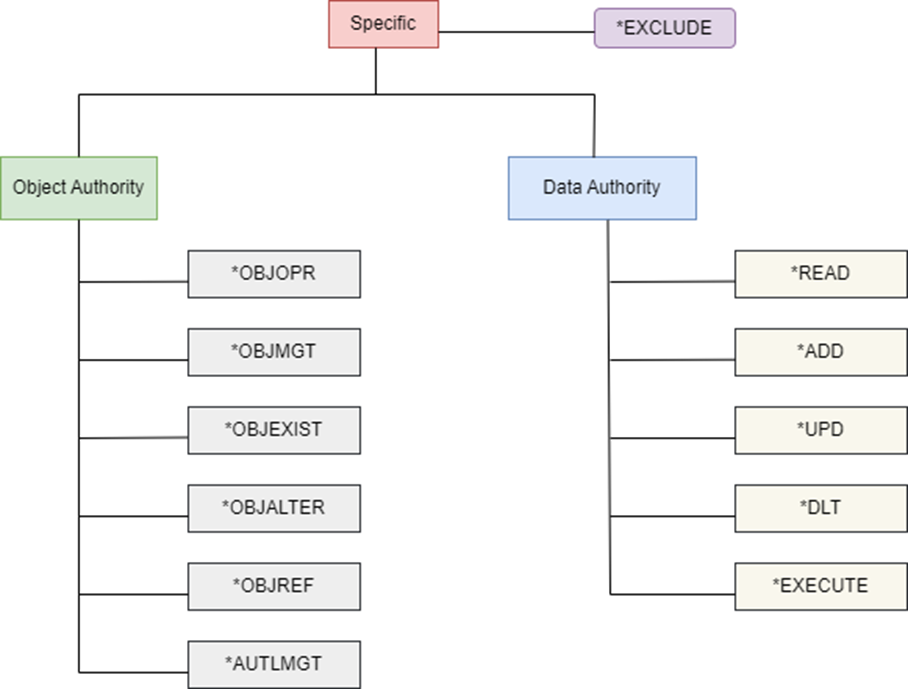
As shown in the figure, these can be further classified into Object authorities and Data Authorities.
Object Authorities
- *OBJOPR: Object Operation Authority authorizes the use of an object. This lets the user view the object’s description regardless of the object’s type, but cannot access data or run the program without appropriate data authority.
- *OBJMGT: With the Object Management Authority, the user can remove and rename objects, change their attributes, and grant or revoke the authority of other user profiles to the object. It is a superset of the object authorities *OBJALTER and *OBJREF.
- *OBJEXISTS: Object Existence Authority lets the user delete, save, restore the object, and transfer ownership of the object.
- *AUTLMGT: Authorization List Management applies only to authorization lists. This authority lets you add and remove user’s authorities to an authorization list.
- *OBJALTER: Object Alter authority authorizes the user to add, clear, reorganize, and initialize database file members and to alter the attributes of database files (SQL tables/physical files or logical files). Besides adding and removing triggers, it can also change the attributes of tables, files, and SQL packages.
- *OBJREF: Object Reference authority lets the user specify a database file or table as the parent file in a referential constraint.
Tips On Object Authorities
- If you do not want a user to have *OBJALTER or *OBJREF authority, you must revoke not only *OBJMGT, but also *OBJALTER and *OBJREF.
- You should restrict *OBJMGT and *OBJEXIST authorities to the object’s owner to reduce the risk of the authority being improperly used or accidentally deleted.
- *OBJALTER and *OBJREF are applied primarily to database files.
- If you want to grant a database administrator or programmer *OBJMGT authority, you can grant only *OBJALTER authority to limit the user to database-specific functions.
- *OBJREF should only be granted to the database administrator or programmer responsible for enforcing referential integrity constraints.
Data Authorities
Data Authorities apply to all object types and are as follows:
- *READ: Enables users to read and retrieve data and entries.
- *ADD: Enables users to insert a new data record or entry.
- *UPD: Enables users to modify existing data and entries.
- *DLT: Enables users to delete and remove data and entries.
- *EXECUTE: Enables users to locate an object in a library or directory, execute a program, service program, or an SQL package.
Tips for Data Authorities
- The *EXECUTE authority allows you to search the contents of a library or directory. To access an object, you need authority not only over the object itself, but also the library or directory where it resides.
- Data authorities also apply to objects that do not have contents.
E.g., to submit a job that uses a JOBD, you need *OBJOPR, *READ, and *EXECUTE authorities to that JOBD.
Authority Interconnection
Having authority in a library does not give you authority over the files within it. You need authority of both the object and library to access that object.
To look for objects in a library, you need to have *OBJOPR authority to the library. To read descriptions of library objects, you must have *READ authority to the library. To add objects to a library, you must have *ADD authority to a library, etc.
You may not require *DLT authority to delete an object from the library. *USE authority is sufficient to delete an object from a library.
However, you should have *OBJEXIST authority to that object and *EXECUTE authority to that library where it resides in order to delete it.
To prevent a user from accessing an object, you must grant that user *EXCLUDE authority to the object. To set the object’s access to “deny by default,” you would set the object’s *PUBLIC authority to *EXCLUDE.
Group Profiles
The purpose of a group profile is to grant specific authority to a particular group of users. To simplify the authority granting process, all individual sources are granted to a group profile, with user profiles associated with that profile as GRPPRF (group profile).
Likewise, multiple profiles could be granted and restricted with some set of authorities as per need and assigned to user profiles as SUPGRPPRF (supplemental group profile). The system searches each profile listed in the group profile and supplemental group profile for a user profile until it finds enough authority to perform the task.
The fewer groups the system must search for relevant authorities, the better the performance. However, the recent upgrades to IBM i systems mean that even if the system must search for appropriate authorities for a lot of groups and supplemental group profiles, there will be minimal difference in performance.
System Value QCRTAUT
When you create a library and do not specify a CRTAUT value, the *SYSVAL default value causes the library to use the value found in the QCRTAUT system value. The default public authority of objects created in any library is set to *CHANGE as IBM ships the QCRTAUT system value set to *CHANGE.
In the current system environment where FTP/SFTP, ODBC, JDBC, and SQL transactions are mostly happening in systems either internally or via HTTPS server requests to the system, the public authority *CHANGE is not a wise choice of state.
Most programmers/administrators prefer to set the value as *USE, or even *EXCLUDE to limit public authority to new libraries and objects. *USE is the most appropriate public authority in today’s environment. The least secure choice is to set it at *ALL, as the newly created library and objects will have *PUBLIC authority set to *ALL. Any user can do any kind of manipulation or even delete the objects under this value.
It is always better to leave the QCRTAUT value as *USE to leave the system library authorities as it is. Then, you can plan and use the CRTAUT attribute in library creation to set up a new set of authorities to be applied to newly created libraries and objects.
System value QCRTAUT does not affect objects created in directories. Also, Changing the QCRTAUT system value does not affect objects that already exist. A change to QCRTAUT affects only objects that are created after the system value is changed.
Authorization List and Its Applications
Objects associated with an application are secured with the Authorization List management tool. For example, new objects created within a warehouse management application must have the same access authority as existing objects in the system. The best way to accommodate this is via an authorization list, as outlined below:
- To create an authorization list to secure an object, use the CRTAUTL
- Then, run the EDTAUTL command to grant a set of authorities to selected users or group profiles.
- Associate all the application-specific objects and libraries to that authorization list by specifying their name in the AUTL parameter on the GRTOBJAUT
- Lastly, you can set each file’s *PUBLIC authority to come from the authorization list by specifying *AUTL in the AUT parameter on GRTOBJAUT.
Advantages of an Authorization List
Even if the files are opened (in use) by any user, the authority can be changed by associating an authorization list.
You are also able to manage access to the authorization list instead of all the individual files. This makes it easier to maintain a bulk of file objects.
A user profile’s private authorities supersede any authority the user has to an authorization list. You can still grant and revoke private authorities to an object using the GRTOBJAUT, RVKOBJAUT, and EDTOBJAUT commands.
Authorization List and Group Profile Comparison
| Authorization List | Group Profile |
| Secures and helps manage access to multiple objects that need the same authority settings | Helps manage multiple user profiles that need the same access and capabilities |
| Let’s each profile have a different authority on the authorization list | Gives all users in the group the same authority |
| An object can be secured by only one authorization list | A profile can be a member of multiple group profiles |
Based on your scenarios and the unique sensitivity and criticality of business data, each system can be customized with the best-suited object security from features in IBM i. The goal is always to protect the data from unwanted and unintentional interventions.
Conclusion
The threats to production data are ever evolving, and the consequences of data breaches can be severe. Businesses must take a proactive approach to safeguarding their digital assets. This involves a combination of robust technical measures, employee training, and a culture of security awareness. By prioritizing data security, organizations can protect their production data, maintain business integrity, and build trust with customers in an increasingly data-driven world. Remember, in the realm of data security, it is not a question of “if” but “when” a threat will emerge, so be prepared.